


Download Serum for macOS
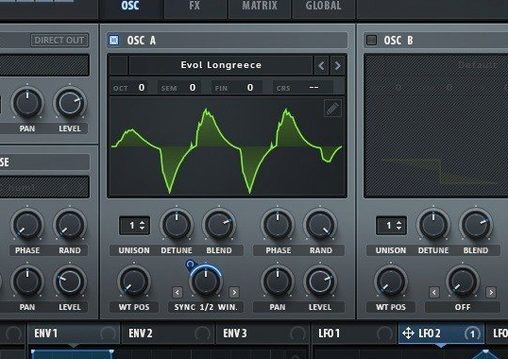
Flat synth patches that sit lifeless in a mix usually come from static waveforms and thin voicing. Serum 2 tackles that by letting you warp, layer and filter a core sound until it moves the way you want.
Stacking octaves into a single note press
- Building thick leads from a single note press using stack settings that layer octaves
- Shifting timbre across unison voices with Unison WT Pos so each voice pulls a different waveform
- Adding movement with flangers, phasers and comb filters that track the played note
English-only interface and offbeat filter designs
- The interface is English only
- Filter types draw from LFOTool and newer designs, so the selection goes beyond standard synth fare
- Unison Warp can skew voice pitch independently for detune that feels more organic
Neighbours in the chain
Serum sits comfortably inside most DAWs on macOS 10.13 and later, showing up as an AU or VST3 instrument. Drag it onto a MIDI track and it slots in without fuss. What makes it play well with others is how little it assumes. It doesn't try to be a channel strip or a mastering suite — it sends audio out clean, ready for your favourite EQ, compressor or saturation plugin downstream.
On the modulation side, Serum listens to standard MIDI CC messages, so a hardware knob mapped to filter cutoff or wavetable position works instantly. You can also route its audio into sidechain inputs of dynamics processors — handy for ducking a pad against a kick without leaving the box.
macOS features like aggregate audio devices and IAC Driver buses open up more routing. Send MIDI from a generative sequencer into Serum, capture the audio in a separate track, and you've got a resampling workflow that takes seconds to set up. For producers who collect free synth presets, Serum loads third-party wavetables without conversion, so sounds from other tools often drop straight in.
Bedroom producer, midnight session
Imagine a producer who makes lo-fi hip-hop after the day job. They open a project with a simple chord progression and reach for a soft pad. Loading Serum, they pick a warm wavetable and immediately thicken it with the stack settings — one oscillator pushing 16 voices spread across two octaves. The chord feels fuller before any reverb touches it.
They map velocity to the wavetable position so softer notes sound more hollow and harder hits bring in brighter harmonics. A comb filter tuned to the root note adds a subtle metallic shimmer that doesn't clash with the vocal sample sitting in the centre. The producer isn't building a patch from scratch — they're nudging parameters until the sound hugs the beat. Twenty minutes later they've bounced the stem and moved on. Serum didn't fight them.
Early stumbles
Beginners often load Serum and immediately scroll through presets, missing the wavetable editor entirely. That's fine for writing, but it leaves half the synth untouched. The first mistake is ignoring the import button — dropping a short vocal sample onto a wavetable oscillator turns it into a playable texture, and many new users never discover this.
Another common slip is cranking unison voices to 16 on every patch without adjusting Unison WT Pos or Unison Warp. The result is phasey mush instead of width. Dialling voice count down to five or seven and then spreading waveform assignments usually sounds tighter. New users also overlook the dual filter routing. Leaving both filters in serial mode when parallel would preserve more body robs patches of weight unnecessarily.
Finally, some miss that the flanger and phaser modules track pitch. Setting them static works for sound effects, but engaging note tracking makes them musical — something that transforms a generic sweep into part of the key.
Under three seconds to load on an M1 Air
On an M1 MacBook Air with 16 GB of RAM, Serum 2.1.5 loads in under three seconds. A single instance playing a four-note chord with 16-voice unison and both filters active sits around 8–10% CPU. That climbs closer to 20% when you add the built-in effects — flanger, delay, reverb — but it's still manageable for a lightweight machine. Intel Macs from the same era show similar behaviour; the plugin runs as a universal binary and doesn't favour one architecture heavily.
Stability is solid. Across long sessions with multiple instances, crashes are rare. The plugin handles automation without crackling, and recalling a project with a dozen Serum tracks doesn't trigger the beach ball. Memory use stays modest — around 120 MB per instance in a busy project. The wavetable editor itself is fluid, even when scrubbing through custom tables in real time. For a synth that does this much visual feedback, it stays responsive.
If you're hunting for a serum vst free mac setup, the installation process on macOS is straightforward once you follow the included instructions. The patch applies cleanly, and the synth shows up in your DAW's plugin list without extra configuration. No background processes, no online checks — it just runs.
- New setting: Ignore VST3 Note IDs — handy for dodging note ID quirks in certain hosts.
- Pro Tools: Automatable parameter shortcuts are now supported.
- Project safety: No more data loss when opening projects saved in newer Serum 2 builds.
- Digital Performer: Tooltip display fixed, plus those intermittent crashes are sorted.
- ACIDized WAV: Files with empty strc chunks now load properly.
- Bitwig Studio: Clip Player macro automation updates correctly again.
- MPE: Values after voice stealing now save as they should.
- Piano Roll preview: Note preview now respects velocity — what you click is what you hear.
- Stability: A possible crash from bad data fed to Serum's processor is fixed.
- Settings UI: The broken interface from 2.0.22 onward is back to normal.
- Preset browsing: Previous/Next buttons no longer jump to ARP — Aardvark after loading a session.
- Pro Tools (Windows): Hangs on shutdown are resolved.
- JUCE hosts (Windows): Interface scaling behaves when Display Scaling isn't at 100%.
- macOS 10.13 or later
- Apple Silicon or Intel 64-bit Mac
Questions I get
Yes — Unison WT Pos lets you spread a different waveform across all unison voices in a single move.







Chat 0
Hop in or make an account to join the chat.
Quiet in here so far. If you have used this build, tell me what the install actually did.