


Download XLN Audio XO for macOS
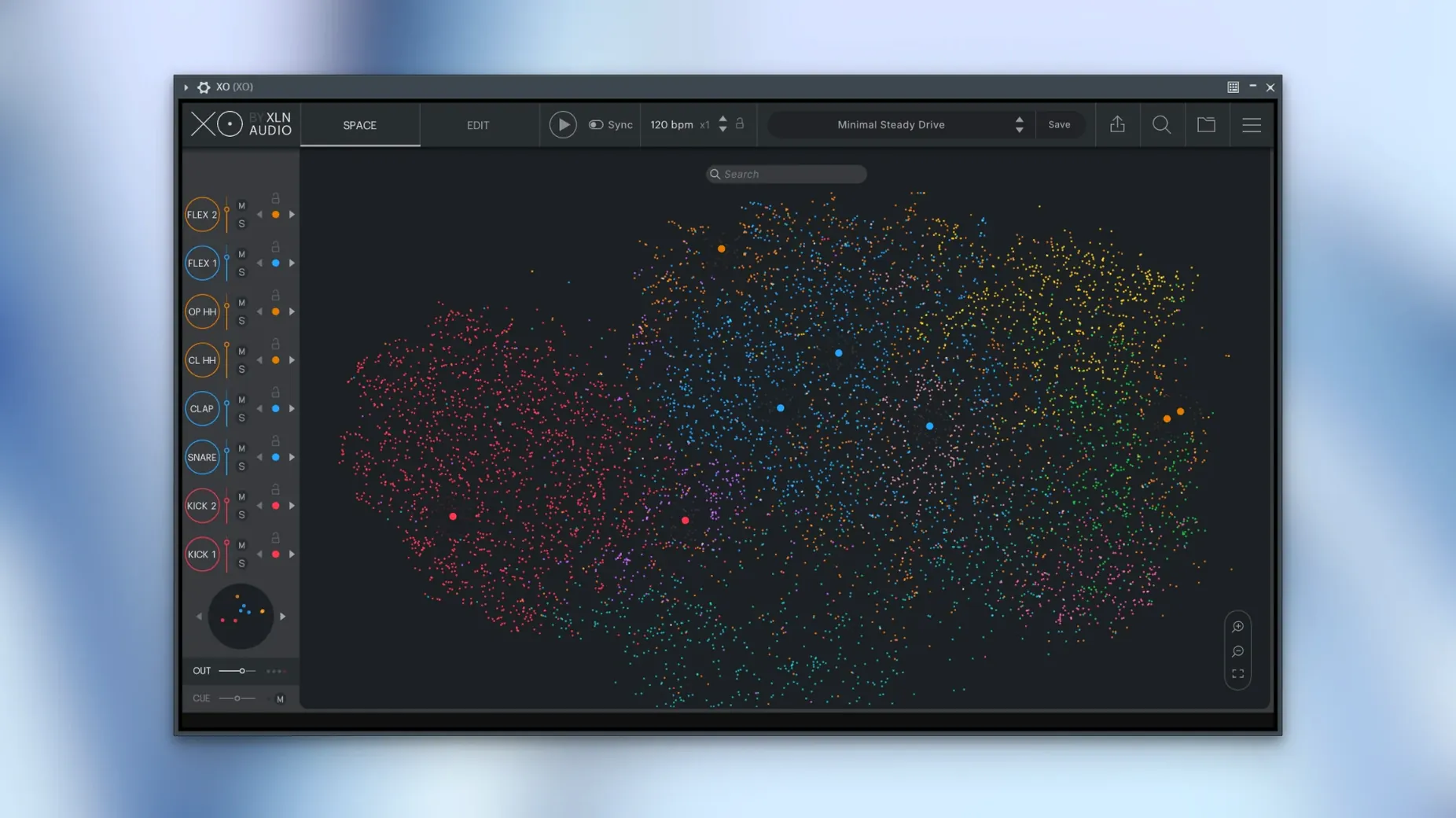
XO runs on any Mac from macOS 10.13 High Sierra onward, with native support for both Intel and Apple Silicon machines. It works as a VST, AU, or AAX plugin inside your DAW, and there is also a standalone app for sketching ideas without opening a host.
- Finding the right hit: Load a folder of one-shots and XO maps them all by sonic character. Kick-like sounds cluster together; crisp hi-hats land in their own zone. You audition samples from the map, not from a list of filenames.
- Groove building on a single track: The built-in sequencer has 240-plus editable beat presets. Drag a pattern to your DAW as audio or MIDI when you want to finish it there.
- Layering on a drum bus: Pull up a kick, then click nearby dots to stack a second or third sample that shares the same weight and tone. The similarity search keeps layering quick.
- Playground mode on a spare channel: This mode shakes up the kit with randomised sample swaps and pattern variations. Useful when a beat feels stale and you want a fresh combination without scrolling.
Warp a kick and a snare from scratch
Open XO on an empty project track. Click the +Folder button and point it at a directory of one-shots — your own stash or the built-in library. The Space fills with dots almost instantly.
Pick a zone where kicks cluster. Audition a few by clicking dots; each preview cuts through cleanly. When you land on one with the right weight, drag it onto lane 1 of the sequencer. Hit Hot Swap and click another dot nearby. The kick changes without losing its place in the pattern. Try three or four until the low end sits how you want it.
Move to the snare zone. Same process — click, audition, drag to lane 2. Use the similarity map to stack a second snare on lane 3, then nudge its volume down in the mixer strip so it adds texture without fighting the main hit.
Open the Accentuator panel and dial up a little punch on the kick lane. Now grab a Groove Template from the preset list — anything swung — and drop it onto the sequencer grid. The pattern adjusts timing and velocity to match the groove. Hit export as MIDI, drag the clip into your DAW, and you have a foundation with velocity curves intact, ready for further processing.
A lo-fi beatmaker’s late-night find
Someone making dusty instrumental hip-hop keeps a folder of cassette-sampled one-shots collected over years. The filenames are a mess — “kick_tape3.wav”, “snr_dusty2.wav”, and so on. Loading that folder into XO turns an unsearchable pile into a visual map. All the woolly, tape-saturated kicks sit together in one cloud; the short, hissy hats form another.
Instead of scrolling by name, they hop between dots by ear. A snare that felt wrong on a previous project suddenly makes sense when heard next to a softer kick from the same neighbourhood in the Space. They build an eight-bar loop using the sequencer, pull a few samples from the built-in 8,700-plus library to fill gaps, and export stems to arrange in the DAW. The whole session takes under twenty minutes.
Pre-install compatibility checks
Does XO only work with its own samples?
No. The similarity engine maps any directory of one-shot WAV files you point it at. The included library is a bonus, not a restriction. Producers often mix their own collection with the factory sounds.
How does the MIDI export handle velocity?
Velocity data from the sequencer — including Accentuator changes and Groove Template swings — carries across when you drag a MIDI clip into your DAW. Version 1.8.10 fixed a bug where muted lanes could interfere with MIDI export, so the output is cleaner now.
Older Mac performance and that start-up patch
XO runs on macOS 10.13 and up, on both Intel and Apple Silicon. The Space map redraws efficiently, and a rare slow start-up issue was patched in the current build. On older Intel machines, keeping the sample pool under a few thousand files keeps browsing snappy.
Good to know: If you ever need to search for the plugin online, people often look for phrases like XLN Audio XO crack, XO torrent, XLN Audio XO torrent, XLN Audio XO crack Mac or XLN Audio XO free download. The version covered here is 1.8.10-2026.09.04-Complete.
The included library counts more than 8,700 one-shot samples, so you have a solid starting set before you even point it at your own collection.
- macOS 10.13 or later
- Intel and Apple Silicon supported
Questions I get
XO analyses the spectral and envelope characteristics of each one-shot sample and places sounds with a comparable profile close together on the map, so kicks sit near kicks and snares near snares.







Chat 0
Hop in or make an account to join the chat.
Quiet in here so far. If you have used this build, tell me what the install actually did.