


Download Xpand!2 for macOS
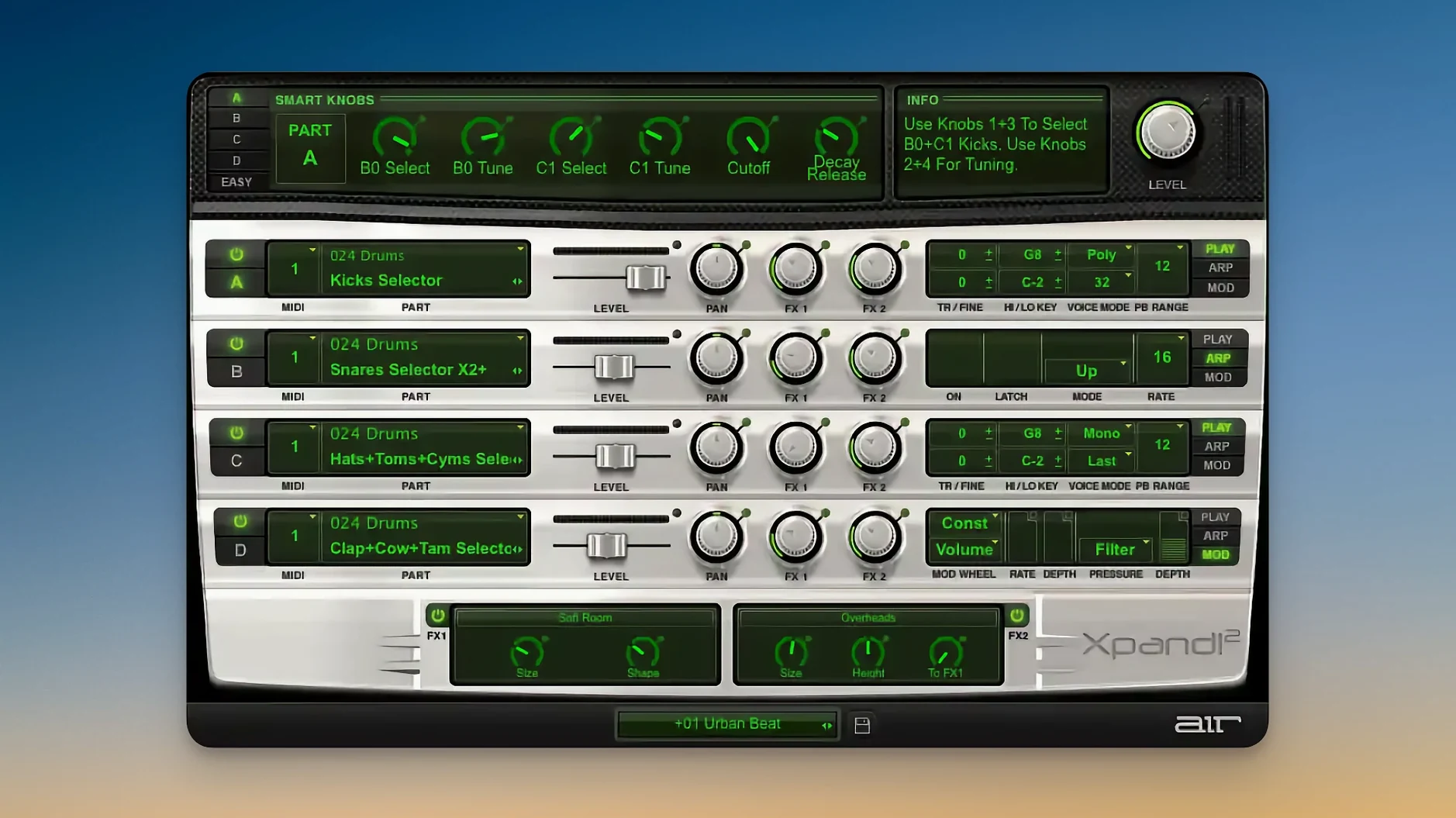
This version adds native Apple silicon support and Retina-ready visuals, so everything stays crisp on current Macs. If you held off updating because of Rosetta, that friction is gone now.
You get VST, AU and AAX formats. Logic Pro, Ableton Live, Cubase, Bitwig, Maschine — it loads wherever you need it.
AU, VST3, and Apple Silicon native
- VST2, VST3, AU and AAX plug-in formats
- Native Apple Silicon — no translation layer needed
- HiDPI and Retina display support
- MIDI Learn, Pitch Bend and Aftertouch across all four slots
- Runs on macOS 13 and above
Sound engine and slot structure
Each patch holds four parts, and every part can pull from a different synthesis method — subtractive, FM, wavetable or sample playback. Polyphonic parts go up to 64 voices; monophonic parts let you set priority to First, Last, Highest or Lowest. Slot-by-slot you adjust note range, mix, arpeggiator, modulation and two effect processors. Across the whole plugin you tap into 50 effects: standard fare like reverb, delay and chorus, plus a few oddballs like Chaos Delay. Six smart knobs give you fast macro control without menu diving.
Building a hybrid pad with movement, step by step
Here’s a workflow for a cinematic pad that breathes without burying the mix — all inside one Xpand!2 patch.
Start with an empty init patch so nothing fights for space. On Part A, load a slow-attack strings patch from the Pads category — something like Analog Strings 4. Drop the octave by one, tighten the note range to C2–C4, and switch the amp envelope release to about 800 ms so it tails out gently.
On Part B, pick a wavetable sweep from the Synth Pads list. Set its MIDI channel to match Part A so both play together. Roll the tone back with the filter knob, then open the arpeggiator. Lock it to 1/8 notes, three octaves, upward motion. Now pull the mix fader down to about 40% — you want texture, not a lead line.
Part C gets a short percussive pluck from the Mallets category. Narrow its note range to C4–C6 and set the arpeggiator to 1/16 notes, random pattern, one octave. Hit the Chaos Delay effect, dial the wet mix to 25%, and watch it scatter sparkle across the stereo field.
Part D stays silent until you need low weight. Duplicate Part A’s patch, drop it an octave further, set the voice mode to Mono with Lowest priority, and restrict notes to C1–C2. That gives you a sub reinforcement that follows the root note without smearing.
Save the patch. Three smart knobs — filter cutoff, reverb send, arp rate — become your performance controls. Ride them with a MIDI controller and the pad shifts from a soft bed to a tense pulse in seconds.
Who clicks with Xpand!2 straight away
Bedroom producers working across hip-hop, R&B and lo-fi get instant value — the 2,500 presets mean you audition sounds more than you design them. A beginner can build a four-layer stack in under a minute and never open a manual. The smart knobs keep the surface friendly; the deeper modulation options stay out of sight until you want them.
Live keyboardists gravitate toward the multitimbral structure. Four parts on four MIDI channels let you split a controller into bass, pad, lead and arp zones without loading extra plugins. Set up once, save the patch, and your whole set travels inside a single instance. On an Apple Silicon Mac, the plugin loads fast enough for soundcheck tweaks.
Sound designers and composers appreciate the synthesis variety in one box. Subtractive, FM, wavetable and sample engines sit side by side, so a single patch can layer a sampled choir with an FM bell and a filtered noise sweep. The 50 effects — from standard reverb to the less predictable Chaos Delay — give you movement options that pure romplers lack.
Four slots, zero tab diving
Next to Steinberg HALion Sonic, Xpand!2 feels leaner. HALion Sonic pulls from a deeper sample pool and offers more engine types, but its interface splits across more tabs and demands more screen time. Xpand!2 keeps the four slots visible at once; if you value speed over depth, that layout wins. HALion Sonic does flex-worthy things with its macro page designer and flexible routing — Xpand!2 doesn’t chase that crowd.
Compared with UVI Workstation, the difference is philosophy. UVI loads libraries; its stock sounds depend on what expansions you own. Xpand!2 ships its 2,500 presets in one go, no extra downloads. The UVI arpeggiator and effects are more sophisticated, but you lose the four-part-per-patch multitimbral workflow unless you stack multiple instances. For sketching ideas fast, Xpand!2 gets out of your way sooner.
Next to Native Instruments Kontakt (the free Player edition), Xpand!2 feels like a synth, not a sampler host. Kontakt Player relies on third-party libraries for character; Xpand!2 has its own voice built in. If you just want a wide palette of playable sounds without managing libraries, Xpand!2 is the simpler choice. Kontakt wins on scripting depth and third-party ecosystem, but plenty of users only need a fraction of that power.
Runs without Rosetta on current Macs
Does Xpand!2 run natively on Apple Silicon?
Yes — version 2.3.1 is built for Apple Silicon, so no Rosetta translation is needed. The interface also supports HiDPI and Retina resolutions, so text and knobs stay sharp on current Mac displays.
Which DAWs load it without issues?
It comes as VST2, VST3, AU and AAX. Logic Pro users grab the AU; Ableton Live, Cubase and Bitwig can use VST3; Pro Tools loads the AAX. If your host runs on macOS 13 or later and supports one of those formats, Xpand!2 should appear after a rescan.
Can I use it live with a MIDI controller?
Yes — MIDI Learn is built in, and each of the four slots responds on its own MIDI channel. Pitch Bend and Aftertouch work across all parts, so a keyboard with expression controls gives you real-time modulation without touching the mouse.
Is it sample-based, synth-based, or both?
Both. Each part can use subtractive, FM, wavetable or sample playback engines. A single patch might layer three sample parts under one FM lead, all with separate arpeggiators and effects.
Good to know: if you’re searching for xpand 2 mac to confirm native support, version 2.3.1 is the one that drops the Rosetta dependency and runs clean on M-series chips.
Good to know: Xpand!2 started life inside the Creative Collection bundled with Avid Pro Tools, so it’s been refined across years of real session use.
- macOS 13 or later
- Apple Silicon Mac
Questions I get
Yes, version 2.3.1 runs natively on Apple Silicon without Rosetta.
Each patch holds four parts, and each part can use a different synthesis engine.
You get 50 effects including reverb, delay, chorus, Chaos Delay, plus two effect processors per part.







Chat 0
Hop in or make an account to join the chat.
Quiet in here so far. If you have used this build, tell me what the install actually did.