


Download reFX Nexus for macOS
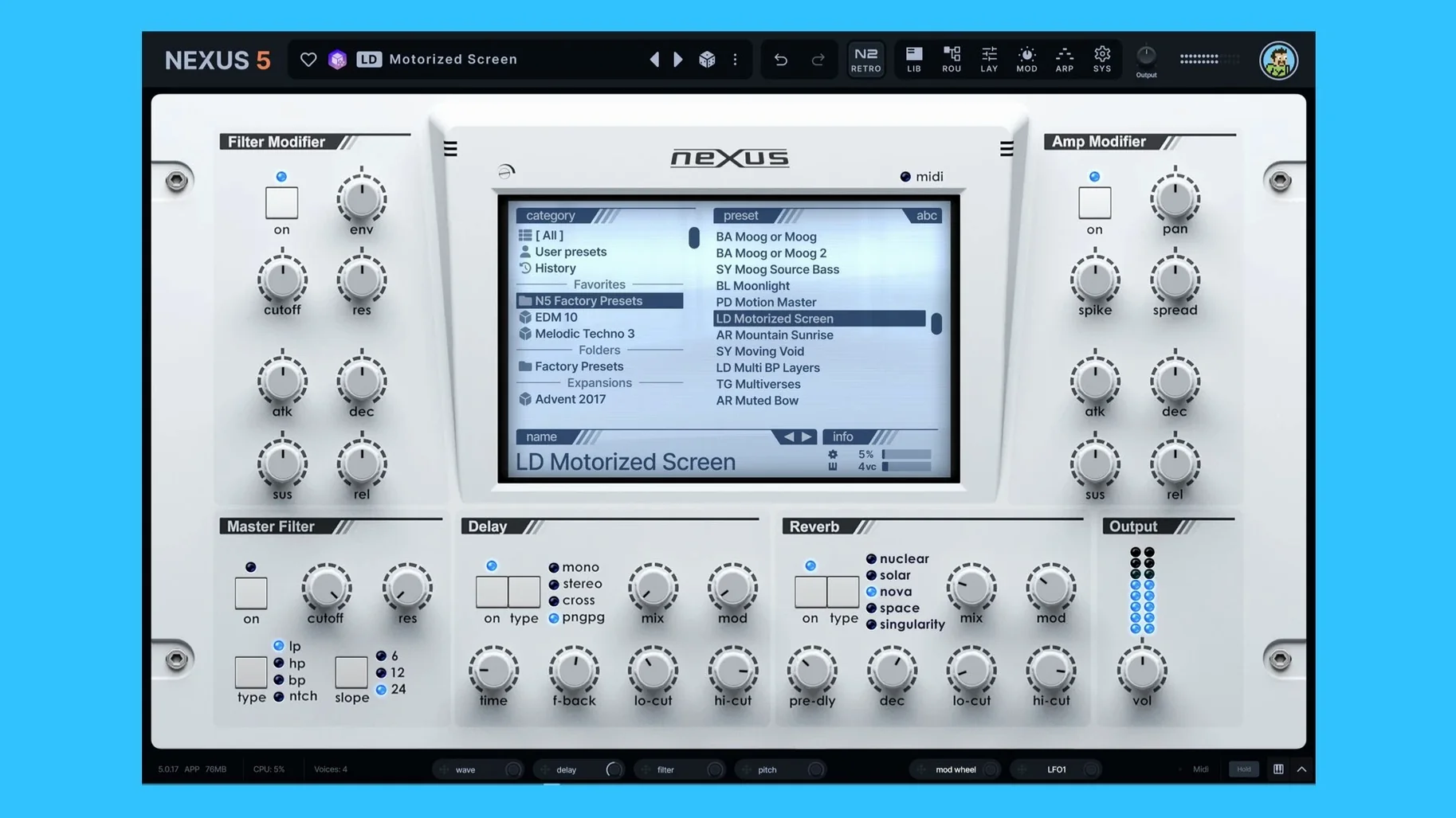
Version 5.5.12 runs as VST3, AU, and AAX on macOS 10.15 or newer — native on Apple Silicon and Intel. That covers most modern DAWs without a bridge.
Good for
- Loading and layering your own samples, multisamples, and sample packs
- Building presets from virtual analog, wavetable, granular, and FM oscillators side by side
- Keeping old NEXUS projects and libraries working in a current host
- Syncing patch previews to your project tempo via the BPM override on the SYS page
Keep in mind
- Custom expansion creation is possible, but it is a preset builder — not a full open sampler
- The built-in effects section covers the basics; complex chains still happen in the DAW
- Skin editor and unison overhaul are new, so community skins are still thin on the ground
The oscillator section now combines five synthesis types in a single patch. Two new wrap modes and a phase modulation destination (min/max) let you push wavetable and granular sources further without leaving the plugin. A dedicated Clipper effect sits at the output stage, and the Ducker can be triggered per keyzone — handy for kick-and-bass patches that need to breathe.
Good to know: the unison engine now handles up to 16 voices per oscillator, and the skin editor lets you rework the entire interface to match a session palette.
A beatmaker’s lunch break
A hip-hop producer grabs a worn set of vocal one-shots and drops them into the sample import panel, slicing on the transients during a short studio gap. Fifteen minutes later the slices spread across the keyboard with crossfades added where the chops feel too abrupt. A single wavetable oscillator rides underneath for low-end weight, and the new Clipper tightens the combined output so the kick punches through without extra DAW processing. The whole patch saves as a custom preset, ready for the evening session.
Sample-built patches over custom wavetable design
Against Serum, Nexus leans harder into sample-based start points — wavetable scanning is there, but the library workflow and expansion structure push you toward built-from-samples results. Serum gives you deeper per-oscillator warping and custom wavetable creation; Nexus trades some of that depth for speed when you are combining multisamples with synthesis.
Stacked beside Kontakt, the difference is scope. Kontakt is a full open sampler with scripting and deep multisample mapping. Nexus is tighter than that: it loads samples quickly, pairs them with analog or FM sources in the same preset, and keeps the routing visibly flat. If you need orchestral multis or third-party scripted instruments, Kontakt still covers that ground. For synth-heavy pop and electronic presets that mix samples and oscillators without building a rack, Nexus moves faster.
Next to Avenger — also from reFX — Nexus feels more immediate. Avenger adds a drum sequencer, deeper modulation, and a busier interface. Nexus puts a single-page modulation section and a simpler effects row in front of you, which suits quick sound design and patch tweaking more than full-track construction.
From a blank patch to a layered lead in seven moves
- Initialise a new preset and drag a short vocal multisample into oscillator slot A. Set the root key and enable crossfade looping on the sustain portion.
- Add a wavetable oscillator in slot B and set one of the new wrap modes to stretch the upper harmonics without harshness.
- Route a slow LFO to oscillator B phase minimum, then assign velocity to phase maximum so harder hits open the wavetable wider.
- Engage the unison overhaul on slot B with 12 voices, detuned just enough to widen the stereo image without losing the vocal core.
- Insert the Clipper on the master output strip and push the threshold until the combined oscillators glue together at the transient peaks.
- Set the Ducker to trigger from keyzone C1 and sidechain it to a ghost kick pattern in the DAW — the lead breathes with the beat.
- Save the patch, then apply a quick skin edit with muted tones to match the late-night project palette.
Good to know: you can match the arp pattern to the host tempo by using the BPM override on the SYS page, then pull that same pattern into the sequencer as an initial step pattern — no manual re-entry needed.
- The Skin Editor now handles dialog windows — you can style the background, title bar, text and buttons.
- A new right-click option in the skin browser lets you open a skin file straight from the context menu.
- Colour names in the Skin Editor appear clean, without internal prefixes cluttering the labels.
- The Impulse oscilloscope picks up the same colours as the rest of your effect displays, so it blends in properly.
- Skins with dots in their filenames now load, save and show thumbnails correctly.
- Knob colours stick after switching back from a light skin to the default one.
- The oscilloscope inside the Impulse import window looks right again.
- Dialog text updates immediately when you switch skins while a window is open.
- Double-tapping Save As no longer pops the window open a second time.
- macOS 10.15 or later
- Apple Silicon or Intel 64-bit
Questions I get
Yes. Version 5.5.12 imports samples, multisamples, and sample packs, and you can create custom presets and expansions from them.
It comes as VST3, AU, and AAX, running natively on both Apple Silicon and Intel Macs from macOS 10.15 onwards.
Yes, it is compatible with existing NEXUS projects and libraries, so older sessions should load without issues.







Chat 0
Hop in or make an account to join the chat.
Quiet in here so far. If you have used this build, tell me what the install actually did.