

Download Pulsar Audio IPA for macOS
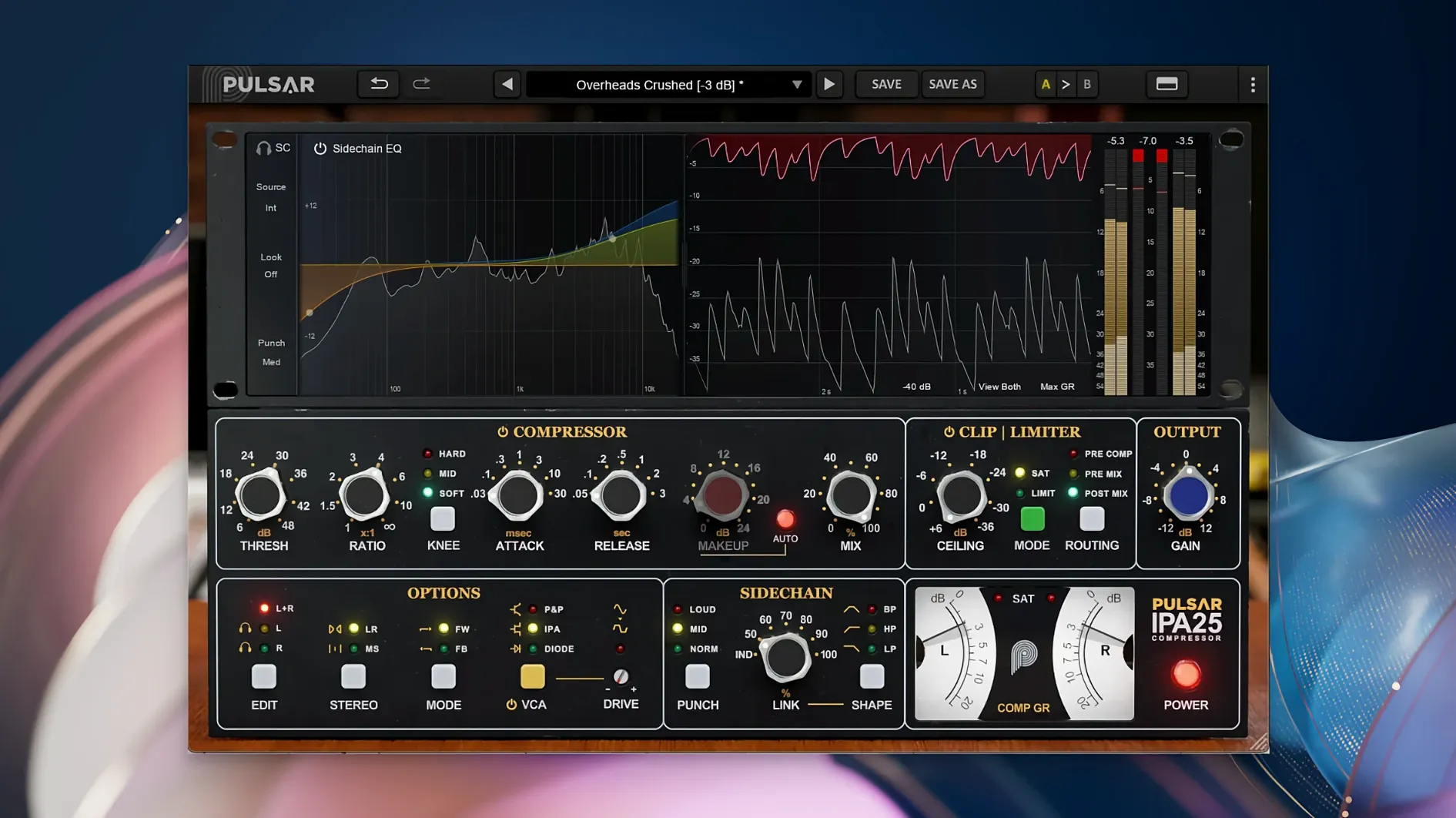
At a glance: macOS 11+, Apple Silicon native, 64-bit only. Pulsar Audio IPA is a plugin — AU, VST 2.4, VST 3, AAX Native. No standalone app; you drop it into a DAW.
Apple Silicon native and four plugin formats
- Runs natively on Apple Silicon Macs and Intel machines via macOS 11.
- Four plugin formats: Audio Unit, VST 2.4, VST 3 and AAX Native.
- Requires a third-party DAW — Logic Pro, Ableton Live, Pro Tools, Studio One and others all work.
Three VCA flavours
The centrepiece is three switchable VCA modes. IPA gives you the API 2500-style grab and punch. P&P/Mu softens the knee, pulling things closer to a vari‑mu feel. Diode pushes into faster, edgier compression. A visual sidechain EQ lets you shape what the detector hears, and Mid/Side processing keeps the stereo image tight. A clipper and limiter sit at the output. It works across vocals, drums, bass lines and full mixes — rock, pop and electronic all sit comfortably.
Mixing a punchy drum bus from scratch
Start by inserting IPA on your drum bus in your DAW — Logic Pro, Ableton, whichever you prefer. Set the VCA mode to IPA first. That classic API-style grab does the heavy lifting on kick and snare without much tweaking.
Pull the threshold down until you see 4–6 dB of gain reduction on the loudest hits. Set attack to 10 o’clock and release to around 200 ms — fast enough to let transients through, slow enough to glue the cymbals and toms. Now open the sidechain EQ panel. Roll off everything below 60 Hz with a gentle high-pass so the kick’s sub energy doesn’t make the compressor pump. Boost a narrow bell around 5 kHz by 2 dB; the detector grabs hi-hats and snare crack a touch earlier, which tightens the whole kit.
Switch to Mid/Side mode and unlink the channels. Leave the mid channel compressing as set. On the side channel, ease the threshold up by 3 dB so the stereo room mics and overheads breathe more. Finally, engage the clipper on the output, dial it back to catch only the sharpest peaks, and push the limiter’s ceiling to -0.3 dB. The result: a drum bus that hits hard, stays wide and never sounds squashed.
First days with IPA: what to do straight away
- Save a default preset with your favourite VCA mode. IPA always opens in IPA mode. If you lean toward the softer P&P/Mu feel on mixes, set it once, save as default and skip the toggle every session.
- Learn the sidechain EQ visually. Open the analyser overlay on a vocal or bass track and watch how the detector responds when you move filter bands. A small cut at 300 Hz on a bass can stop the compressor overreacting to muddy low-mids.
- Try the diode mode on parallel compression. Crank the input, set a fast release, blend the compressed signal underneath your dry track. Diode brings a raspy bite that works well on room mics and synth stabs.
- A/B the clipper and limiter separately. Solo the clipper on a snare track and push it until you hear it round the transient, then back off. Then engage the limiter alone. Knowing what each stage does stops you over-processing by stacking both.
Unbalancing the stereo image with heavy M/S compression
Over-cooking M/S compression on a full mix. Mid/Side is powerful, but unbalancing the channels by more than 2–3 dB of gain reduction difference can tilt the stereo image. If your mix suddenly feels lopsided, bypass M/S and check mono compatibility.
Ignoring the sidechain EQ entirely. IPA’s detector is fast, and a busy low-end makes it clamp down on every kick drum hit. Without a high-pass in the sidechain, your mix loses punch. Even a 50 Hz cut helps the compressor breathe.
Using Diode mode as a bus compressor without auditioning. Diode mode is fast and colourful — great on individual tracks, but on a mix bus it can harden the top end. Always toggle back to IPA or P&P/Mu and compare before printing a mix.
Stacking the clipper and limiter too early in a session. Both are output-stage tools. If you engage them while still dialling in compression, you misread the actual dynamic range. Leave them off until the VCA behaviour is set, then bring them in gently.
- macOS 11 or later
- Apple Silicon or Intel Mac
- 64-bit plugin host (DAW)
Questions I get
No. It is a plugin only and requires a third‑party DAW application to load and use it.
Three switchable modes: IPA, P&P/Mu and Diode. Each shifts the compression character from punchy and forward to softer or edgier.
AU, VST 2.4, VST 3 and AAX Native — covering all major DAWs on Mac.







Chat 0
Hop in or make an account to join the chat.
Quiet in here so far. If you have used this build, tell me what the install actually did.