
 Dorico Pro
 DriveDx
 Dropover
 Dropzone 5
 Duplicate File Finder Pro
 DockView
 DVDFab
 djay Pro


Version 2.1.4 tidies up a crash that could hit on launch when certain fonts were installed. If you'd been caught by that, it's sorted now.
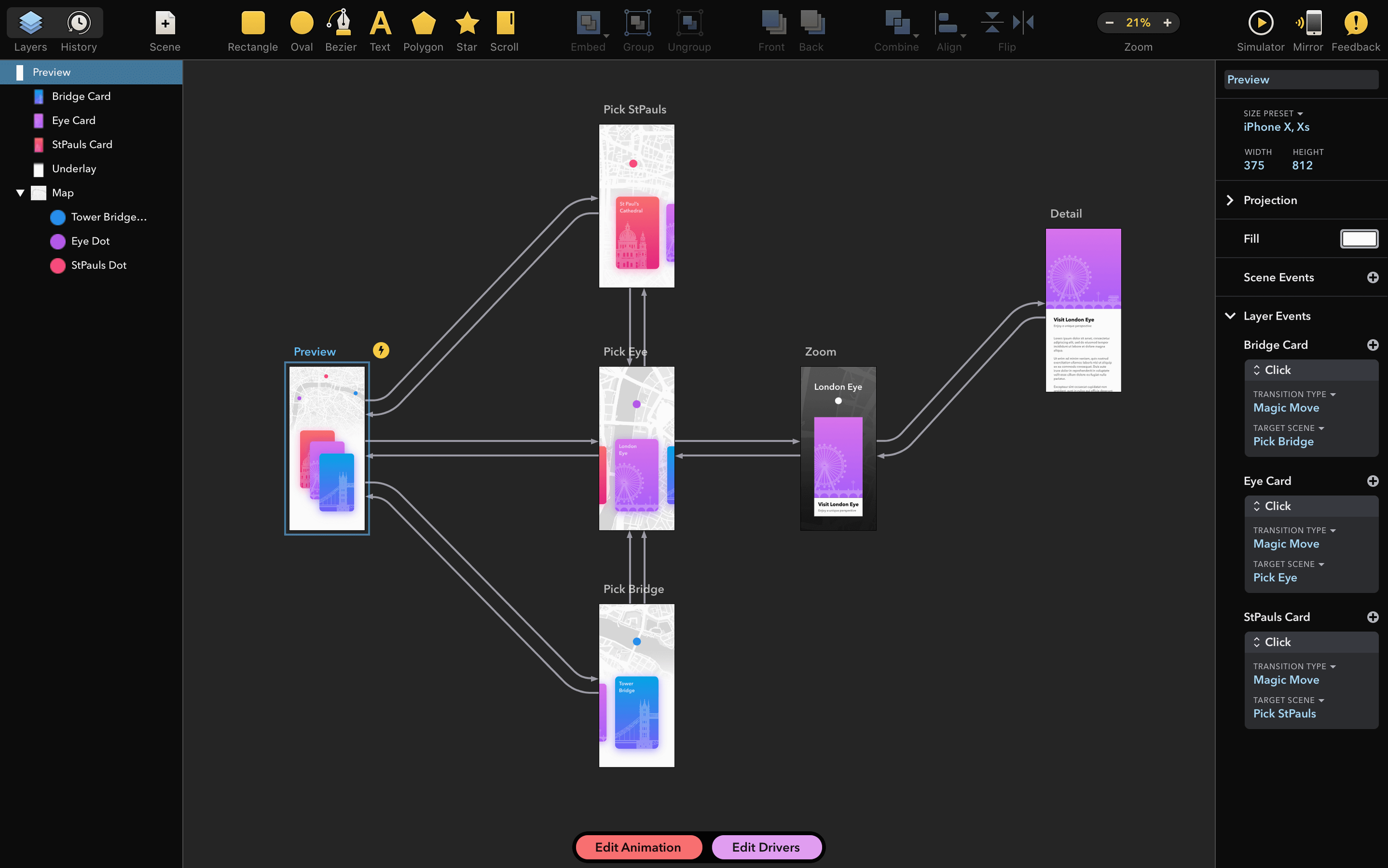
Drama is ready to go straight after you drag it into Applications. The tool sits somewhere between a layout pad, a motion sketchbook and a clickable prototype builder — useful when you want to test how something feels before writing a line of code.
Fresh installs ship with a few defaults that aren’t everyone’s taste. The canvas zoom behaviour is one — it snaps to whole percentages by default, which can feel jumpy on a trackpad. Switching to smooth zoom in the View menu makes scrubbing through designs much more fluid.
If you work with colour-accurate mockups, turn off the automatic canvas background tint. Drama picks a warm grey out of the box, but a neutral white or black background (set in Canvas Preferences) stops it from skewing how your palette reads at a glance.
Also worth a look: the default keyframe easing curve is set to linear. Dig into the Animation panel and switch it to an ease-out preset. Your motion prototypes will feel instantly more natural, and you’ll spend less time finessing every transition by hand.
Drama isn’t trying to replace Sketch or Figma. It slots into a gap — the messy middle ground between static mockups and coded interactions. You might rough out screens in your usual layout app, pull the PNGs or vectors into Drama, then wire them up with taps, hovers and page transitions.
On the macOS side, it plays well with Quick Look. Saved .drama files show a thumbnail preview in Finder, so scanning a folder of prototypes is fast. Drag a video export onto a Keynote slide or a Messages thread and it just works — no re-encoding dance. The app also respects macOS colour profiles, so what you see on a P3 display stays consistent when you drop frames into a developer handoff doc.
If you use PaintCode, the shared developer DNA shows. Both apps treat vectors as first-class citizens. Shapes you draw in Drama handle boolean operations and bezier edits in a way that feels familiar if you’ve spent any time in PixelCut’s other tool.
Version 2.1.4 is a small release on paper — one line about a font-related startup crash — but the fix matters in daily use. Before the patch, certain font families (particularly some older OpenType sets with malformed name tables) could beachball the app before the welcome window even appeared. Designers who lean on large, eclectic font libraries were the most likely to trip over it.
With that out of the way, launching Drama is uneventful again. No special steps, no font cache clearing. For anyone who’d been working around the issue by temporarily disabling fonts, that workaround can finally be retired.
The Intel-only architecture hasn’t shifted, so Rosetta 2 handles things on Apple Silicon Macs. In practice, animation playback stays smooth for prototypes with under a couple dozen artboards. Heavier documents show a slight warm-up delay on first playthrough, then settle in.
Good to know: if you’re sharing prototype recordings with a remote team, export at 2x resolution. The built-in h.264 encoder leans on Intel Quick Sync, which churns through the frames noticeably faster than a software fallback would.














Chat 0
Hop in or make an account to join the chat.
Quiet in here so far. If you have used this build, tell me what the install actually did.