
 BetterMouse
 BetterTouchTool
 BBEdit
 BetterZip
 Beyond Compare
 BatFi
BatFi Bartender

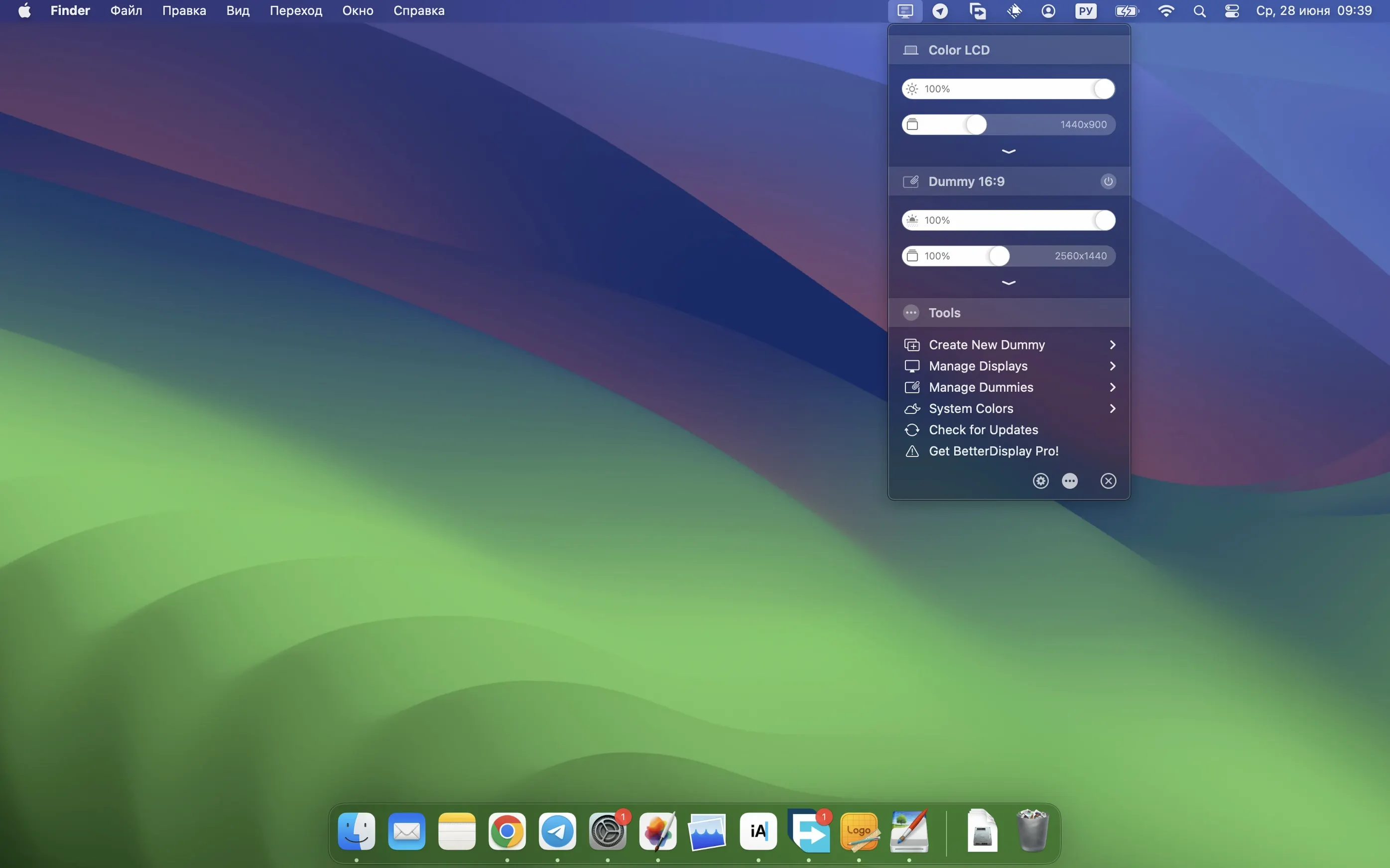
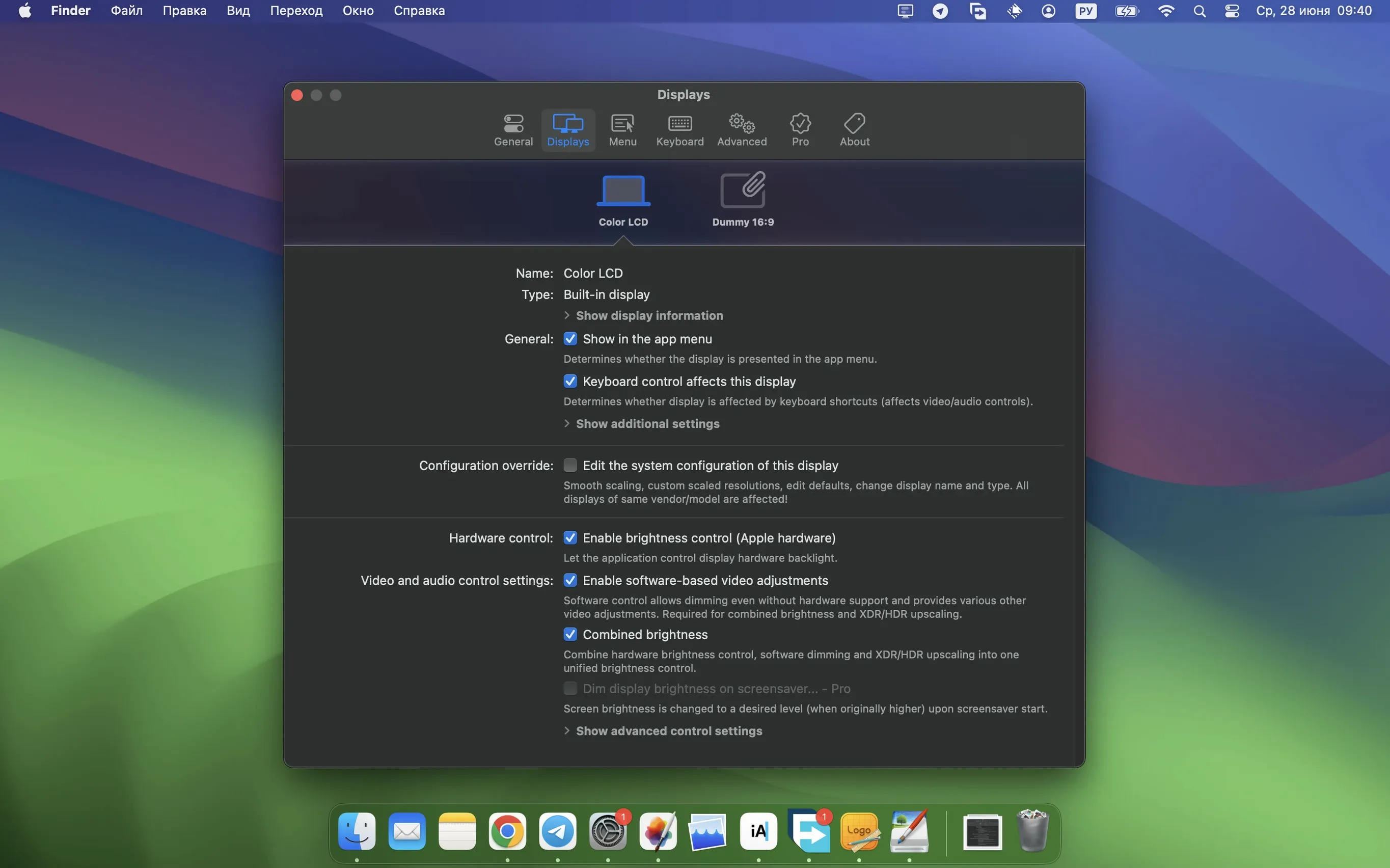
When the default display controls on your Mac feel scattered and rigid, a single utility can pull everything together. BetterDisplay Pro puts resolution scaling, brightness, colour tweaks and virtual screens within reach.
Display scaling — crisp, flexible resolution and HiDPI control beyond what System Settings offers.
XDR/HDR upscaling — pushes brightness higher on compatible Apple Silicon Macs, so HDR content stays punchy.
Virtual displays — creates extra screen real estate or picture-in-picture windows for any connected display.
DDC control — hardware-level brightness and colour adjustment on external monitors, now faster across multi-display setups.
Menu bar hub — quick access to configuration overrides, presets and stream filter automation without digging through panes.
Version 5.0.6 sharpens the visuals with stronger sharpening effects while smoothing out device control configuration. The interface stays focused on what you need at the moment, whether you are juggling a multi-monitor desk or fine-tuning a MacBook Pro’s built-in panel.
Mac users with multiple external monitors see the fastest payoff. Juggling different resolutions, brightness levels and colour profiles across two or three screens becomes a single-menu affair instead of a hunt through System Settings.
XDR and HDR display owners — especially on recent Apple Silicon MacBook Pros — notice the brightness headroom right away. If you edit HDR video or just want brighter whites in a sunlit room, the upscaling makes the panel feel less constrained.
Anyone running a mixed-brand desk setup — say, an LG next to a Dell — benefits from DDC control that speaks to both monitors without switching cables or OSD fiddling. The app also clicks with people who stream or record their screen: virtual displays and picture-in-picture windows give you a clean source to capture without exposing your real desktop clutter.
Plenty of Mac utilities touch display settings, but few go as deep. Lunar excels at external monitor brightness and volume via DDC, yet it stops short of HiDPI scaling tricks and virtual screens. If all you need is smooth brightness syncing, Lunar sings. BetterDisplay Pro casts a wider net — scaling, colour LUTs, and display overrides sit alongside DDC in one tool.
MonitorControl is lightweight and open source, popular for basic DDC brightness and contrast. It lacks virtual displays, picture-in-picture, and XDR upscaling altogether. For a simple single-monitor desk, MonitorControl may feel adequate. The moment you want per-display scaling or stream-friendly virtual screens, the gap widens.
SwitchResX has long been the go-to for resolution overrides and custom HiDPI modes. It still holds its own for deep tinkering with EDID and display timing. BetterDisplay Pro wraps similar override power in a cleaner, shorter learning curve and layers on brightness, colour and virtual-display features SwitchResX doesn't attempt. If your priority is resolution alone, both work; if you want one hub for resolution plus hardware controls, BetterDisplay Pro covers more ground.
After dragging the app into Applications and opening it, spend ten minutes building two or three display presets. Capture a daytime setup with high brightness and a scaled resolution you like, then a dim evening preset with warmer colour and lower sharpening. The menu bar switch between them takes a second.
Turn on stream video filter automation early. It stops colour shifts and flicker when apps like Netflix or QuickTime grab the frame buffer, and having it on from day one prevents head-scratching later.
If you use an external keyboard with brightness keys that never quite worked, check the DDC input mapping pane. Mapping those keys to control the external display rather than the built-in panel often fixes the mismatch instantly.
For multi-monitor desks, label each display in the app with its physical position — "Left LG", "Centre Studio Display", "Right Dell". The names appear in the menu bar dropdown and save you from guessing which serial number is which when adjusting individual screens.
Cranking sharpening too high, too soon. The stronger sharpening effects in version 5.0.6 are tempting, but a light touch looks more natural. Dial it up in small increments and check text rendering and photo edges before you commit.
Ignoring virtual display resolution. New users sometimes create a virtual screen and leave it at a low default resolution, then wonder why window content looks soft. Set the virtual display to match the target use — a crisp 2560×1440 for recording tutorials, or a smaller size for a picture-in-picture reference window.
Forgetting DDC cable requirements. DDC control needs a compatible connection path. USB-C to DisplayPort usually works, but daisy-chained docks or old HDMI splitters can block the signal. If brightness sliders are greyed out, check your cabling before blaming the software.
Leaving XDR upscaling at maximum constantly. It nudges power draw and thermals upward on a MacBook. Reserve the peak for HDR editing sessions or bright rooms; a moderate setting handles everyday browsing without taxing the fans.
Good to know: searching for a betterdisplay pro download will surface the latest build directly, and the app keeps its configuration in a straightforward local file — easy to back up before a macOS update.
Yes, it supports both Apple Silicon and 64-bit Intel Macs running macOS 26 or later.
DDC lets the app talk directly to external monitors for hardware-level brightness and colour changes, without touching the monitor’s own buttons.
Absolutely. The app can create and manage virtual displays, including picture-in-picture windows for any connected display.














Chat 0
Hop in or make an account to join the chat.
Quiet in here so far. If you have used this build, tell me what the install actually did.