
 Sensei
 Serato Studio
 Shadowrocket
 Sidebar
 RubyMine
 Sketch
 SketchUp Pro
 RightFont


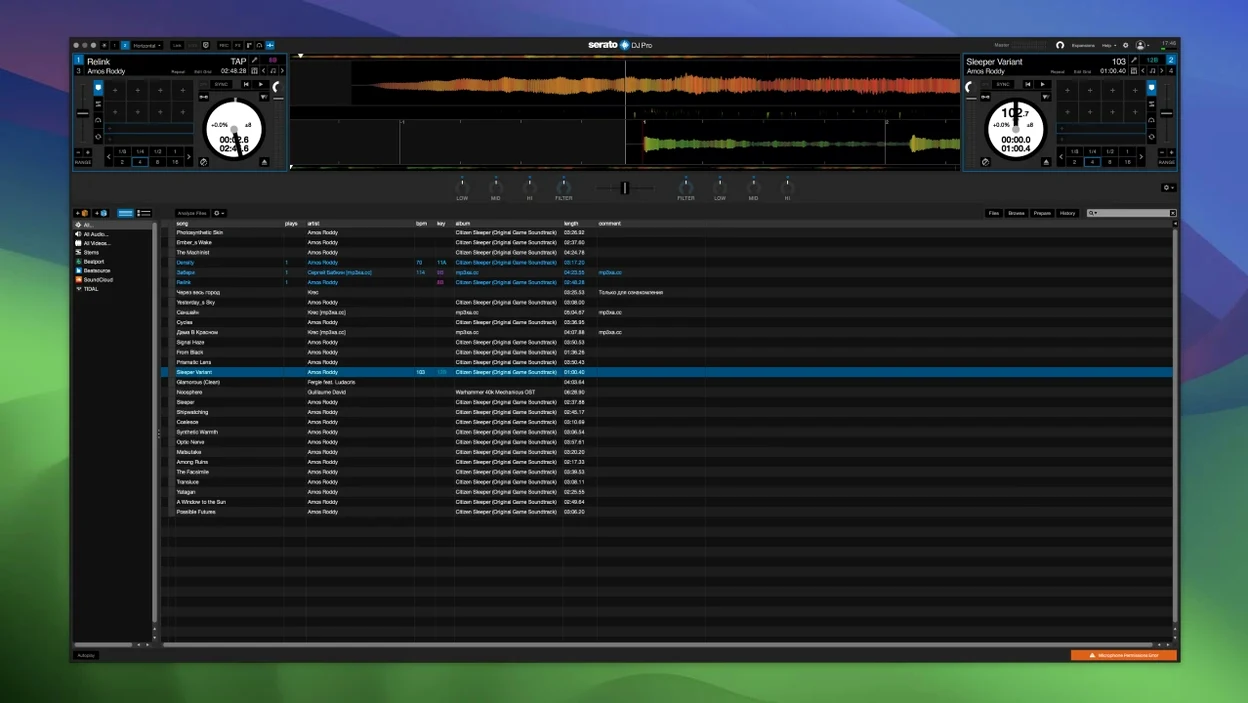
Version 4.0.5 lands as a maintenance release, keeping the core tool steady while refining hardware customisation and stem controls.
Stems Pad FX — Apply Echoes, Brakers and other effects directly to isolated song parts.
One-press acapellas — Create vocals-only or instrumental tracks with a single button press.
Stems controls — Map performance pad behaviours to hardware for instant access to vocal, melody, bass and drum layers.
Slip Release — Customise how quickly the track snaps back after a slip, now adjustable per controller.
macOS 12 Monterey — Minimum requirement. Runs natively on both Intel and Apple Silicon machines.
Everyone stumbles on the same few things when they move to Serato DJ Pro. Knowing them ahead of time saves you that quiet panic mid-set.
Not checking the hardware connection first. The software defaults to internal mode until it sees a supported controller, mixer or interface. Plug everything in before you launch the app. Launching first then plugging in often means a blank deck screen and five minutes of unnecessary troubleshooting.
Ignoring the library backup prompt. Serato nudges you to back up your crate data every few sessions. New DJs click past it. Then a macOS update or a drive hiccup wipes their carefully sorted playlists. Let it save the backup file somewhere safe.
Treating Stems like a magic button. Isolating vocals or drums works brilliantly on well-mixed tracks, but beginners expect studio-clean separation from every mp3 rip. Old recordings, poorly encoded files and dense rock mixes give muddy results. Preview the stem quality at home before you rely on it live.
Forgetting to calibrate the crossfader. A factory-default crossfader curve feels sluggish for quick cuts. Open the mixer settings and tighten the curve to match your style — sharp for scratching, gentle for long blends. Small adjustment, completely different feel.
Piling effects without gain-staging. Stacking Echoes, reverb and Brakers onto stems pushes levels into the red fast. Watch the master meter. Pull the channel gain back a couple of dB if you plan to layer pad FX heavily.
A few questions come up so regularly that answering them here feels sensible. No marketing fluff, just what you actually need to know.
Does it work without hardware? Yes, but only in practice mode. You can prepare crates, set cue points, analyse tracks and even test stems offline using just your Mac keyboard and trackpad. To play out through speakers or headphones with proper pre-fade listening, you need a supported Serato device connected.
Will my existing library survive the switch? If you already use Serato DJ Lite or an older Pro build, your crate structure and analysed files carry over. The software reads the same database format. Importing from Rekordbox or Traktor takes a little more effort — you export playlists as M3U or XML and rebuild cue points manually. Not elegant, but workable.
How heavy is it on an older Mac? On an M1 or M2 machine, it barely breathes hard. On a 2018 Intel MacBook Pro, stem separation adds a couple of seconds of processing per track. Analyse your library overnight and the performance during a set stays smooth. The app itself runs lean; stems are the only part that truly stresses the CPU.
Do you need to be online? No. Once installed and activated, the software runs entirely offline. No cloud dependency, no login checks mid-performance. The one exception is streaming integration, which obviously needs a connection.
Out of the box, Serato DJ Pro leans conservative. A few quick tweaks make it feel like yours.
Library zoom and layout. The default waveform view eats screen space. Drag the divider up to give your crate browser more room, or collapse it entirely when you mix from a known playlist. Switch to vertical waveforms if you read tracks better that way — the option sits under the View menu, not buried in preferences.
Playback behaviour. By default, loading a track onto a playing deck starts it immediately. Many DJs prefer the track to load paused. Tick "Protect Playing Track" in the playback preferences so you never accidentally drop a song onto a live channel. While you are there, set "Playback Key Display" to show musical key in Camelot notation if you mix in key.
Stems pad mapping. The default Stems layout puts vocals and melody on the top row, bass and drums below. If your controller has velocity-sensitive pads, assign the layers you use most to the most responsive physical pads. Pad sensitivity curves live in the MIDI tab, and they are worth dialling in per device.
Auto-gain target. Serato analyses track gain during library import and adjusts playback level automatically. The target default is 92 dB. If your recordings run hot, drop it to 89 dB to stop the limiter from clamping down on every transition. Find it under the Library settings tab.
Screen brightness on Apple Silicon. On MacBook Pros with XDR displays, the dark waveform colours look fantastic but sip battery. Lower the screen brightness manually before a long set; the app itself does not manage display power.
The software casts a wide net, but a few types of Mac user genuinely thrive with it.
Club and bar DJs who need to walk into any booth and work. Serato's hardware support list covers Pioneer, Rane, Denon, Numark and a dozen other brands. When a venue has a mixer with a built-in Serato interface, you plug one USB cable into your Mac and the decks appear. No driver installs, no audio routing puzzles. That reliability is the reason working DJs stick with it.
Open-format performers juggling genres and decades. Stem isolation lets you pull a bassline from a 90s hip-hop track and layer it under a modern pop vocal on the fly. The crate search is fast enough to find a request while one deck plays. If your sets swing from disco to dancehall to indie rock, the prep tools save you hours of editing in a DAW beforehand.
Turntablists who care about vinyl feel. The customisable slip release, adjustable crossfader curves and native DVS support make scratching feel right. You set the tension digitally and the record responds as expected. No workaround, no third-party plugin.
Bedroom DJs who want the same tool the pros use. You do not need club bookings to justify the software. The preparation mode works on any Mac without hardware connected. You can build sets, test acapella blends and experiment with pad FX at home, then plug into a friend's controller and everything is ready. The learning curve is gentle enough that a few weekends get you comfortable.
Casual users who only play pre-made playlists at house parties may find the feature set overkill. For them, Serato DJ Lite does the job. But if you ever plan to play out, starting on Pro means you never have to relearn your workflow later.
Serato DJ Lite is the entry-level version with a simplified feature set, while Pro includes the full stem controls, Pad FX, and hardware customisation.
It requires macOS 12 Monterey or later and runs natively on both Intel and Apple Silicon Macs.














Chat 0
Hop in or make an account to join the chat.
Quiet in here so far. If you have used this build, tell me what the install actually did.