
 Sublime Text
 Super Vectorizer Pro
 SuperDuper!
 Steinberg Nuendo
 Sweet Home
 SwiftServer - Monitoring & SSH
 Swinsian
 Squash


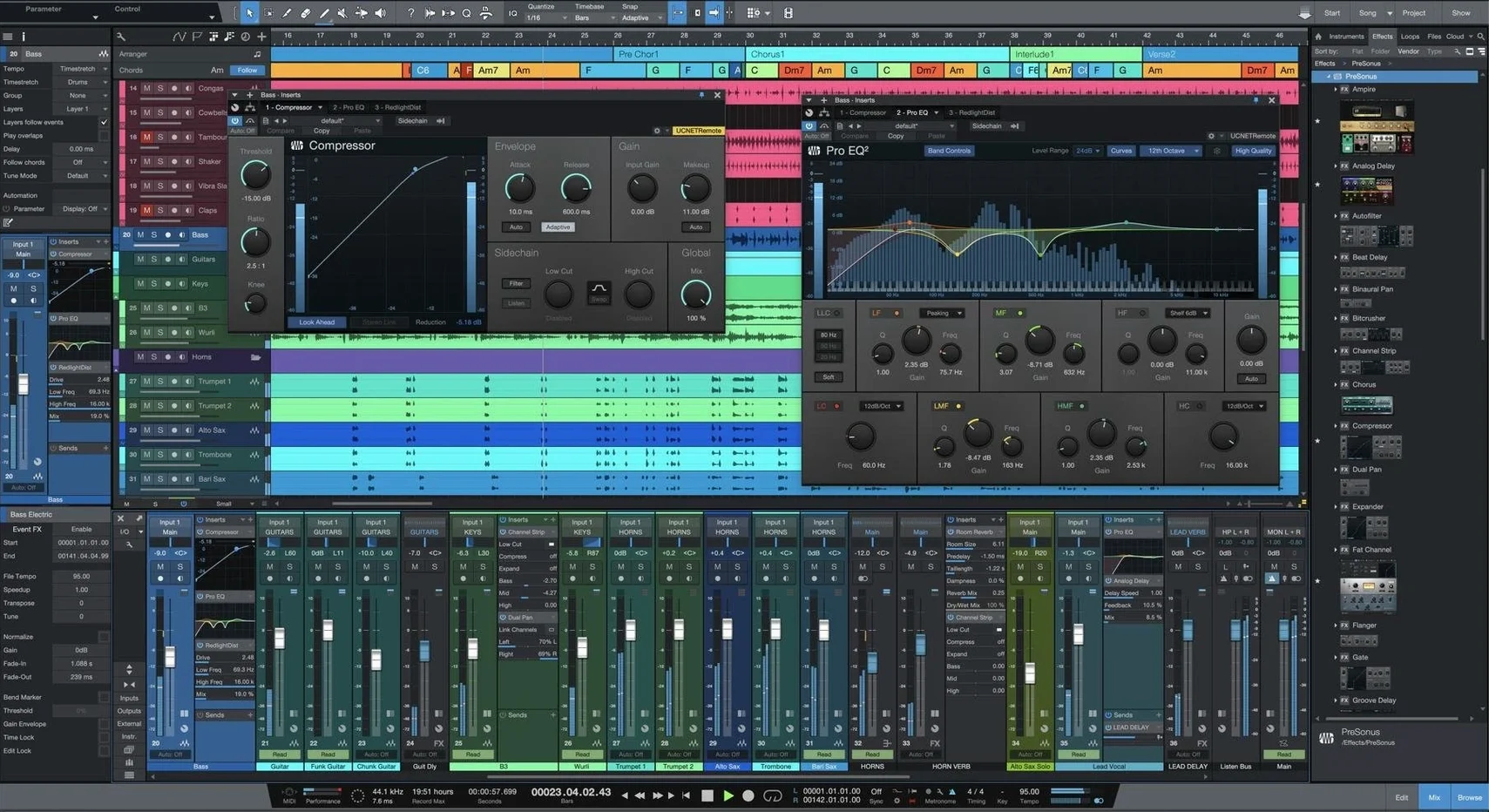
Studio One 7 needs macOS 12.4 or later and runs on both Apple Silicon and Intel Macs. It installs as a fresh application, so your existing Studio One setup stays untouched.
The whole package is designed to feel less like engineering and more like playing — the interface steps back and lets the music stay front and centre.
Version 7.0.0 doesn't just add features — it shifts how you move around the app day to day. The big ones land in three places.
Stem Separation changes the cleanup game. Before, pulling a guitar out of a stereo mix meant hunting down the original multitrack or settling for a messy EQ hack. Now you drag a file in, let the offline AI do its work, and get four clean stems — vocals, drums, bass and the rest. It runs locally, no cloud uploads, so a rehearsal recording from your phone turns into usable parts before the kettle boils.
Tempo detection got smarter without getting louder. Older versions mapped basic, steady tempos fine. Version 7 handles the wobbly stuff — old vinyl samples, a live drum take where the chorus pushes a little faster, that acoustic demo recorded without a click. You drop the audio in and the grid bends to fit the performance, not the other way around. Less time squinting at transient markers, more time building around the groove you already have.
Unlimited Launcher Scenes loosen the arrangement. Used to be you'd sketch a few clip variations then run out of slots. Now you can stack as many Scenes and Playlists as the song needs. It feels closer to a sampler's pad grid — try a verse with a different bassline, trigger a stripped-back chorus, drop a bridge idea in without committing. Live performers get the most out of it, but even for writing alone, it stops you from falling in love with the first arrangement too early.
Say you're a songwriter with a handful of voice memos and a cheap condenser mic. Three decent takes of a new song sit on your phone — acoustic guitar and vocal, live in the room, no click.
You drag the best take into Studio One. The tempo detection reads the natural push and pull and maps a tempo track to it. Now the grid means something: you can drop in a simple kick and shaker pattern that breathes with the performance instead of fighting it.
From there, you grab a bass sound from the bundled instruments and play along. No fussing with the interface — drag it to the track header, it loads, you record. The guitar take feels thin, so you duplicate the track, pan one wide left and the other wide right, and nudge the copy a few milliseconds. Instant width, no plug-in yet.
Later you remember a half-finished session from last month with a Rhodes part that might fit. You open it, drag the Rhodes into the current song's tempo map, and it snaps into place. The Smart Template workflow means none of this required building a track layout from scratch — the template already had the routing, the reverb send and a rough mastering chain sitting on the master bus.
By dinner, you have something that feels like a record, not a demo.
Logic Pro. Logic runs deep for the price, and its stock sound library is enormous. But its windowing can feel like a maze — editors float, mixers split into tabs, and the tool-switching muscle memory takes time. Studio One keeps more of the session in one window. Drag-and-drop is consistent everywhere; Logic's drag behaviour changes depending on where you are and what tool is active. For someone who wants to move quickly without learning key commands first, Studio One's approach tends to click sooner.
Ableton Live. Live thrives on the clip-launching, performance-first mindset. Version 7's Launcher Scenes and Playlists pull Studio One closer to that territory, but Live still leads for pure improvisation on stage. Where Studio One pulls ahead is the linear side — comping vocals, editing multitrack drums, and the dedicated Project page for assembling masters. If your work splits between stage and studio, Studio One covers both reasonably well. If you never touch a traditional timeline, Live might still feel more natural.
Cubase. Cubase and Studio One share a lot of DNA — both strong on MIDI, both deep mixing environments. Cubase has more historical baggage in its menus and preference panels. Studio One tends to surface common actions faster: right-click a track, the context menu is short and relevant. For a newer producer, that means less time in the manual. For a veteran switching DAWs, the transition is less about learning and more about unlearning where things used to be.
Studio One plays well with others, especially when you lean on what macOS already does.
Drag audio straight from the Finder or a Voice Memos recording into the timeline — no import dialog, no file conversion prompt. The same drag works with third-party sample managers and sound library apps. If you keep a folder of field recordings on your desktop, it doubles as a quick-access palette.
AU plug-in support means instruments and effects you already own — from boutique compressors to soft synths — show up in Studio One's browser without extra scanning steps. The app respects macOS audio routing, so aggregate devices and multi-output interfaces set up in Audio MIDI Setup appear as expected. For podcasters or streamers splitting audio between a DAW and a broadcast tool, this keeps the routing visible and consistent.
For those searching for studio one torrent or studio one 7 torrent to explore the DAW, the offline Stem Separation in version 7 is worth understanding — it runs entirely on your Mac's processor, no internet needed. That matters if you're working on a laptop at a café or in a rehearsal room with patchy Wi-Fi. The same applies to the tempo detection and Launcher improvements; they're local features, not cloud gimmicks.
If you're coming from an older version via a studio one mac torrent or a studio one 7 mac torrent, note that version 7 installs separately and leaves your existing installation alone. Both can sit on the same Mac while you test whether the new features earn their place in your daily workflow. Projects saved in 7 won't open in older versions, so keep a backup before committing a song to the new format.
For the sharing stage, the Project page handles the final polish — sequencing, levels across tracks, metadata for streaming platforms. Export formats slot into macOS sharing sheets, so sending a bounced WAV or MP3 to a collaborator via Messages or AirDrop is a couple of clicks. No digging through finder paths unless you want to.
No, ReWire is not supported in Studio One 6 or Studio One 7.














Chat 0
Hop in or make an account to join the chat.
Quiet in here so far. If you have used this build, tell me what the install actually did.