
 Vellum
 Wolfram Mathematica
 Ulysses
 Typora
 XMind Pro
 Timemator
 Things
 Text Workflow


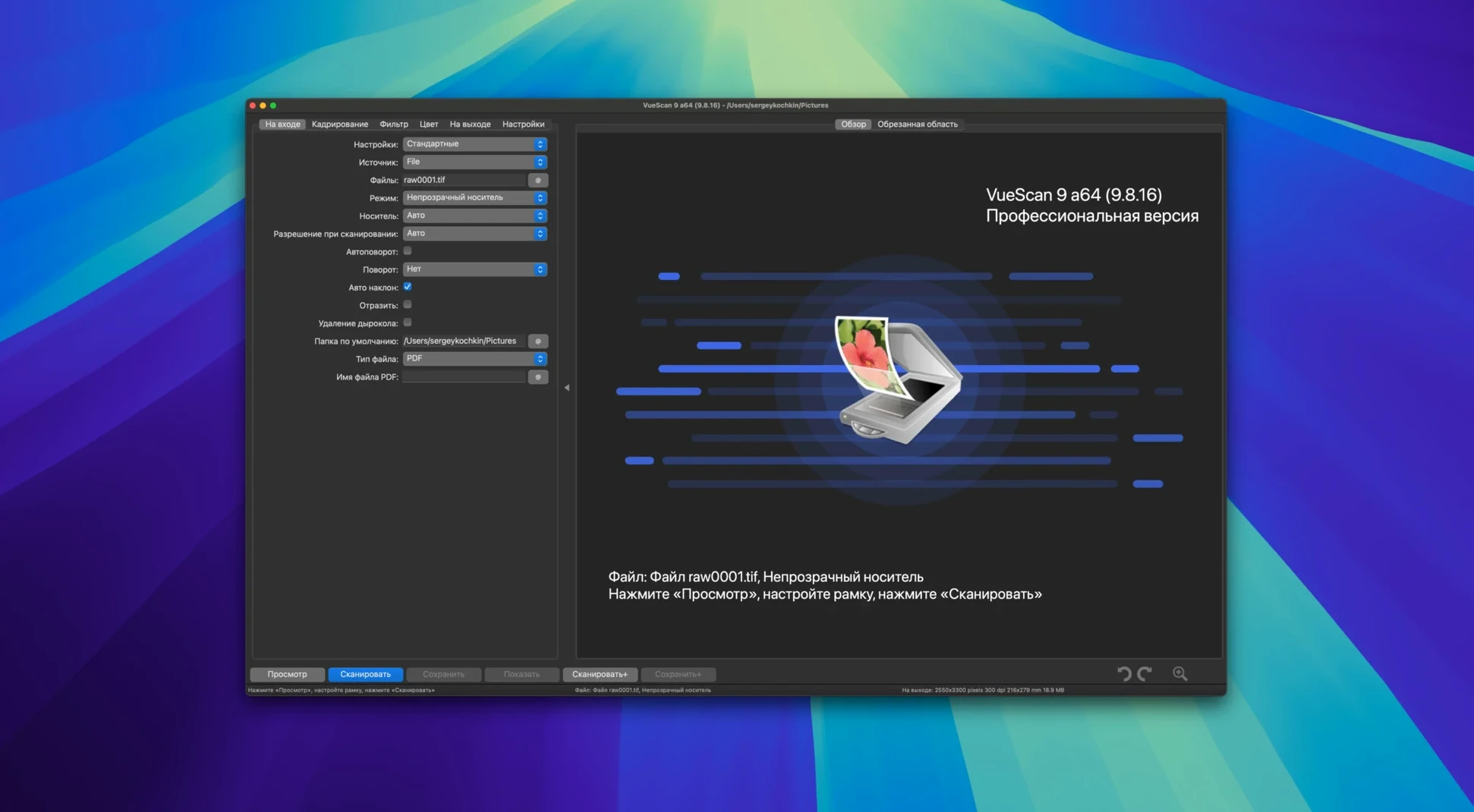
VueScan Pro is the bit of software you install when your scanner's own app gives up, or when you want a single consistent set of controls across every scanner in the office.
It doesn't try to replace your photo editor. You scan, clean up obvious dust via the infrared channel if your model has one, and save a clean file. From there you open it in whatever you normally use to crop or tweak. Batch processing for colour correction and super-resolution means you can queue a stack of old prints and walk away while VueScan works through them. You can also save raw scanner data to a file now, process it later with the scanner unplugged, and have the app stamp folders with the current date automatically.
Hamrick Software added 18 new models from Epson and Brother in this update alone, but the bigger story is the catalogue of over 6,000 supported devices. If a macOS update drops the driver for an old flatbed, VueScan often supplies its own. The settings panel gives you manual control over the things the one-button scan apps hide, and you can save any combination as a reusable profile so different people at the same desk get predictable results without redoing the setup each time. It runs on both Apple Silicon and Intel Macs.
You slide a faded 6×4 onto the glass, close the lid, and VueScan already knows the scanner model. The preview pops up in under ten seconds. You drag a marquee around the actual photo, ignoring the white border. The app reads the crop and shows a live histogram. You're not guessing exposure — you're nudging the white point until the snow on the mountain stops looking grey.
Next you flip to the Filter tab and tick Infrared clean. Your old Nikon has an IR channel, and VueScan uses it to map dust spots. You watch the preview sharpen up as the grain reduction kicks in, set to Light because you still want some texture. You save a profile called 35mm print — light clean and hit Scan. The file lands on your desktop as a 48-bit TIFF. No second-guessing, no driver crash.
You've got 40 mounted slides from the 1980s and a scanner with a slide feeder. VueScan's batch mode turns this into a single setup job. You load the first four, preview, and lock the focus. The trick is in the Crop tab — you set it to Auto with a fixed output size of 4000×2600 pixels. That way every slide gets the same framing regardless of mount drift.
You pick Color tab, switch from Auto Levels to Manual, and pull the red channel curve up just a touch because these Ektachromes always lean blue. Save the settings as a profile, then queue all 40 scans. VueScan names them slide001+1.tif, slide001+2.tif, and so on — the increment pattern is new in 9.8.57 and it's a small thing that saves a rename pass later. You go make coffee while the feeder clicks through.
~/Scans/{date} and never manually sort by month again. The app fills in the current date at scan time.The USB improvements in this build matter on macOS setups where the scanner would previously disconnect after sleep. VueScan now reconnects without a power cycle, and you can unplug the cable mid-session and plug it back in without restarting the app. Small polish, but it adds up when you're scanning a hundred frames a week.
VueScan Pro 9.8.59 rolls out with the latest stability tweaks and scanning refinements from the developer.
Yes, it supplies its own scanning software for many models, so you can often keep using a scanner even after the manufacturer stops updating its drivers for newer versions of macOS.
You can save your current settings to a separate file and load it later as a profile, which is handy if you switch between scanning documents, negatives and prints regularly.
Saving raw data lets you capture everything from the scanner in one pass, then process and adjust colours or remove defects later without needing the scanner connected.













Chat 0
Hop in or make an account to join the chat.
Quiet in here so far. If you have used this build, tell me what the install actually did.