

Download Supertone Air for macOS
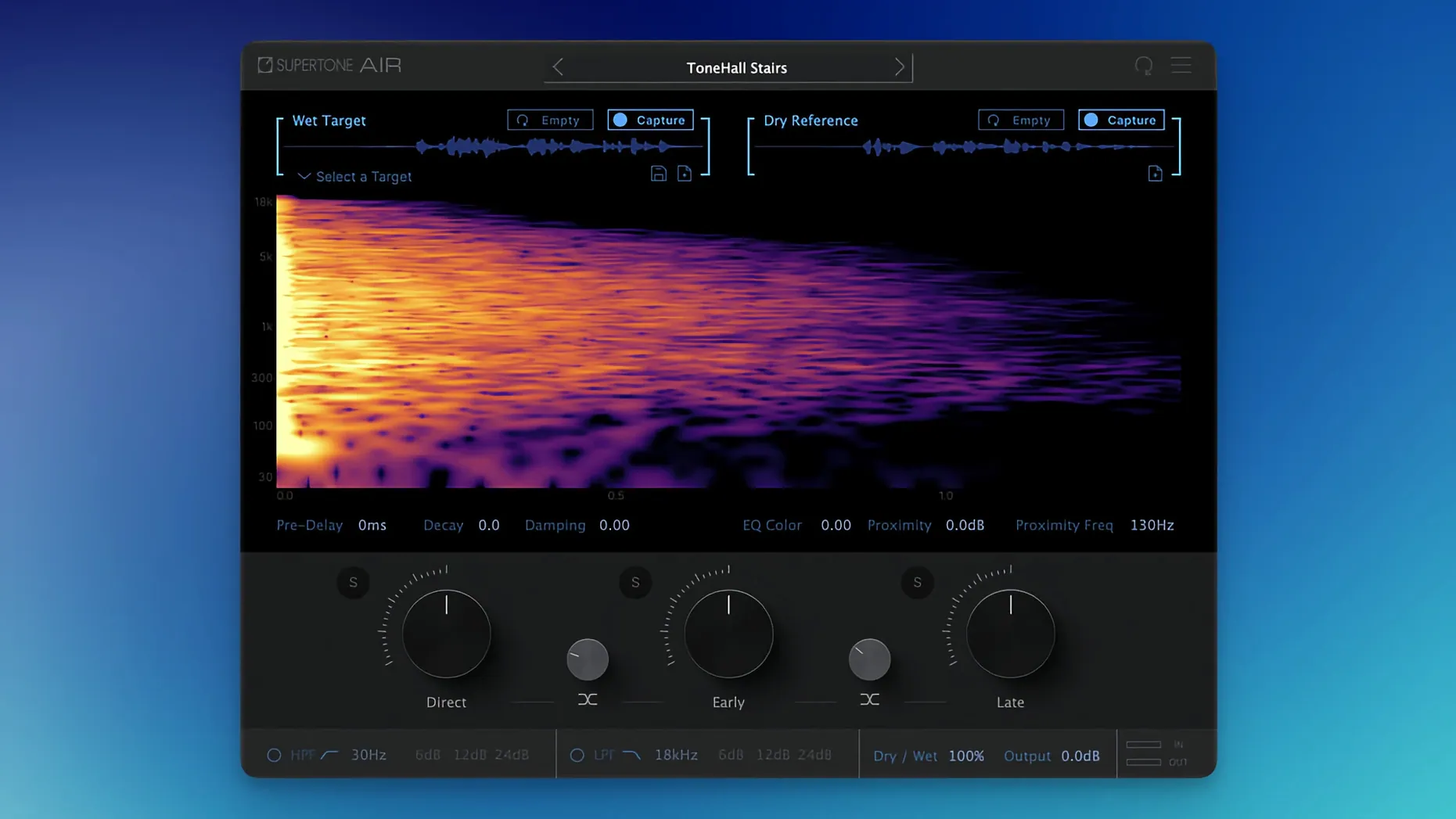
Production audio has a baked-in space that a booth recording lacks. Supertone Air bridges that gap in a few clicks.
Match — Analyses a source clip for its reverb and tonal fingerprint.
Apply — Prints those characteristics onto dry dialogue, making ADR sit in the same room as the location track.
Formats — Runs as AAX, VST3, and AU on Apple Silicon and Intel Macs. Session sample rates of 44.1, 48, and 96 kHz are supported.
Profile sharing — Captured spaces can be exported as WAV files or saved as Air profiles that move between systems.
The plug-in combines reverb and equalisation matching in a single window, so you are not hopping between a convolution loader and an EQ trying to line up ambiences by ear. It is built purely for dialogue, with no music-focused extras to work around.
Renamed plug-in file clears list confusion
The jump to 1.0.1 [GUISEPPE] tidied up two friction points that tripped people during setup. The plug-in file was renamed from Air to Supertone Air, which clears up any confusion in your plug-in list when you are scanning for it mid-session. Before the change, some menus showed the shorter name and left you guessing.
The bigger fix targeted an install clash. If you had Sound Particles Air sitting in the same plug-in folder, the older Supertone build could refuse to load or vanish from Pro Tools entirely. The update resolves that conflict, so both plug-ins coexist without one blocking the other. Day to day, that means fewer support tickets and no last-minute rescans while a director waits for the next take.
Checking system and host compatibility first
AAX, VST3, and AU support beyond AudioSuite
AudioSuite offline processing is where Air feels most at home, and that is the workflow Supertone emphasises. But the plug-in also loads in AAX real-time, VST3, and AU hosts, so you can use it inside Nuendo, Logic, or Reaper just as easily. Real-time instances do add latency because the neural network needs a lookahead window; offline rendering avoids that entirely.
Runs on Intel Macs back to High Sierra
Yes. The minimum is macOS 10.13, and the binary covers both Intel and Apple Silicon natively. A 2015 MacBook Pro on High Sierra can run it, though analysis times will be longer than on an M-series machine. Sample rate support tops out at 96 kHz, so 192 kHz sessions need a real-time SRC step beforehand.
Voice-trained engine limits music usefulness
Nothing stops you from throwing a drum room or a synth stem through it, but the training data and control set are built around voice. Reverb tails are shaped for speech intelligibility, not for the long blooms you might want on a string quartet. It will apply a space to any source; just know the results are tuned for the human voice.
Fix missing plug-in by clearing old cache
Plug-in doesn't appear after install. If you previously ran Sound Particles Air, the old file name collision might still be cached. Clear your host's plug-in blacklist, rescan, and confirm the file is called Supertone Air. On macOS, also check that the component, VST3, and AAX files all landed in the correct folders — a custom VST3 path in your DAW preferences can hide it.
Analysis sounds thin or the match misses the room tone. Air needs a source clip with enough room tail to learn from. A lavalier recording that is mostly direct signal gives the neural network very little to capture. Feed it a few seconds of silence or room tone from the boom mic instead, then apply the profile to the ADR clip. That small swap often fixes a weak match.
Offline render takes longer than expected. The plug-in is optimised for AudioSuite, but 96 kHz material with long clips will still take a moment. If you are in a hurry, capture the space at 48 kHz and match at the same rate, then upsample the result. The difference in reverb fidelity is negligible for dialogue.
Exported WAV impulse responses sound quiet. The WAV export is a representation of the captured space, not a normalised impulse. Bring it into a convolution reverb and normalise it there if you plan to use it outside Air. The profile format is the cleaner way to share settings between Air instances and keeps the direct, early, and late reflection balances intact.
If you are searching for a way to try it, phrases like supertone clear torrent or supertone clear mac torrent sometimes surface, but the plug-in you want is Supertone Air. The current build on Mac is straightforward to set up, and the installer includes straightforward activation notes that walk you through the rest.
- The plug-in now appears as Supertone Air, matching its current name.
- Fixed an install conflict for users who had Sound Particles Air on the same system.
- macOS 10.13 or later
- Apple Silicon or Intel processor
- Host that loads AAX, VST3, or AU plug-ins
- 44.1 kHz, 48 kHz, or 96 kHz session
Questions I get
Yes, captured spaces can be exported as standard WAV impulse responses for use in other projects.







Chat 0
Hop in or make an account to join the chat.
Quiet in here so far. If you have used this build, tell me what the install actually did.