
 FL Studio
 Folder Preview Pro
 Folder Tidy
 Find Any File
 FontLab
 Final Cut Pro
 Fork
Fork FileMaker Pro


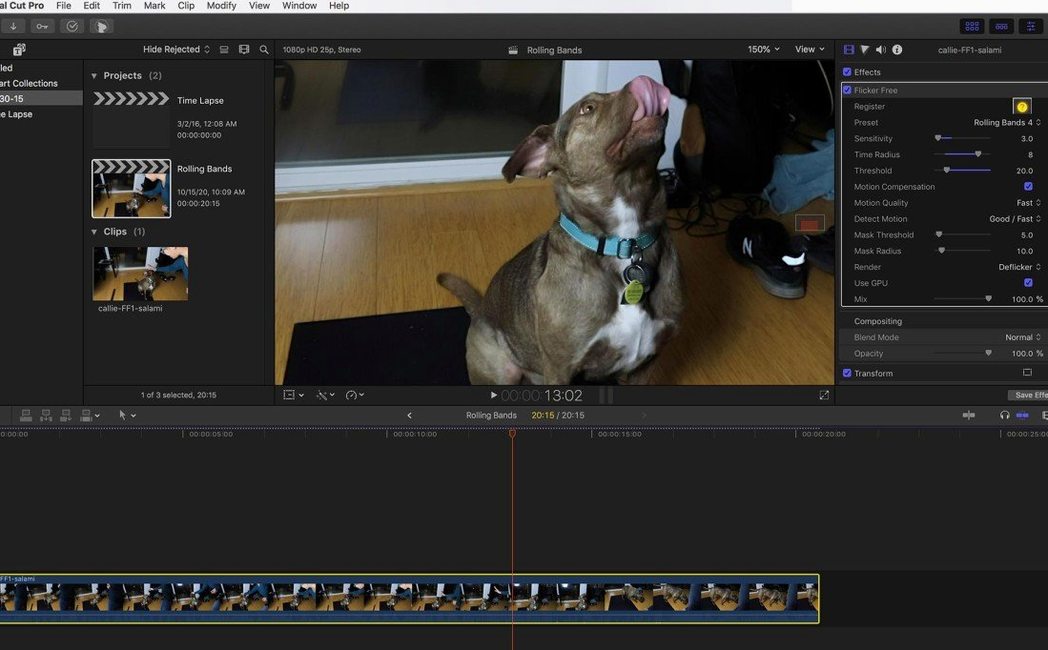
Flicker Free 2.1.6 runs on any Mac that handles the host application, with native support for both Apple Silicon and Intel processors. You drop it into Final Cut Pro, After Effects, Premiere Pro, Avid Media Composer, DaVinci Resolve or any OpenFX-compatible editor. It is a third-party plugin, not a built-in editor effect, so the install stays out of your way until you pull it up from the effects panel.
The plugin targets the uneven exposure you get from unsynchronised cameras, LED lighting cycles and rolling shutter bands. It works across time-lapse sequences, slow-motion clips and regular handheld footage where a light source pulses out of phase with the shutter. A set of presets keeps the workflow short: pick the one that matches your shot, tweak a slider if you need to, and the frame-to-frame brightness evens out without softening detail.
Because it lives inside your timeline, there is no round-tripping to a separate app. You apply it, preview the result in real time and adjust strength on the clip. The interface is English only, and the download includes clear activation steps. For anyone cutting under fluorescent lights or wrestling with cheap LED panels, it turns a tedious frame-by-frame fix into a single effect drag.
Flicker Free slots in after colour correction and before any film grain or stylised looks. On a Mac, it picks up your GPU through the host — Metal in Final Cut Pro, CUDA or OpenCL in After Effects — so the frame analysis doesn't bog down the rest of your timeline. You can also stack it with Digital Anarchy's own Beauty Box or Samurai Sharpen if you're already in that ecosystem, though it plays just as nicely with built-in macOS Core Image filters.
If you use Compressor or Media Encoder for final exports, the plugin's effect bakes into the render queue automatically. No extra pass needed. For editors who lean on Finder tags and quick previews, the processed clip behaves like any other ProRes or H.264 file once it leaves the timeline — thumbnails, Quick Look, everything works.
Picture someone who spent sunrise on a rooftop with a Sony A7S III, capturing 800 raw frames of the city waking up. Halfway through the sequence, a building's LED signage kicked in and introduced a slow rolling band that pulses every third frame.
Back in After Effects, they import the image sequence, drop Flicker Free onto the adjustment layer and pick the Time Lapse preset. The plugin scans the luminance drift across the affected frames and smooths it out in under a minute. They scrub through, check a few problem frames with the before/after split view, nudge the sensitivity slider down a touch, and send a short test render to the RAM preview. The band is gone. The window reflections keep their natural falloff. No one watching the final clip would guess the sign caused trouble.
RE:Vision Effects DE:Flicker tackles similar ground — time-lapse and high-frame-rate flicker — but leans harder into motion-adaptive analysis. It gives you more knobs for interpolation modes, which can rescue extreme strobing. The trade-off is a steeper settings panel that asks you to understand frame blending logic. Flicker Free stays closer to a preset-first approach: fewer decisions, faster result.
BCC Flicker Fixer (part of Boris FX Continuum) handles rolling bands and fluorescent flicker well and integrates tightly with Avid and Resolve. Because it ships inside a large suite, you get it alongside hundreds of other effects. That breadth is useful in a shared post house, but it also means a heavier install and a less focused tool for the one job. Flicker Free is a small, single-purpose plugin that doesn't pull in dependencies you don't need.
Built-in deflicker in DaVinci Resolve Studio works on the colour page and uses optical flow analysis. It's free once you own the Studio licence and handles minor exposure drift capably. Where it falls short is on multi-frame rolling patterns from PWM-dimmed LEDs — exactly the kind of artefact Flicker Free was built to chase. If you're already in Resolve and the shot is mild, start there. If the built-in tool leaves a ghost of the band, Flicker Free is the next logical layer.
It handles flicker from LED lighting, time-lapse exposure shifts, slow-motion light pulses and unsynchronised cameras, including rolling bands from electronic shutters.
It runs as a plugin inside Final Cut Pro, After Effects, Premiere Pro, DaVinci Resolve, Avid Media Composer and other OpenFX hosts.














Chat 0
Hop in or make an account to join the chat.
Quiet in here so far. If you have used this build, tell me what the install actually did.