
 Gemini
 Garden Planner
 Glyphs
 FxFactory Pro
 Guitar Pro
 FotoMagico
 Guitar Rig
 ForkLift


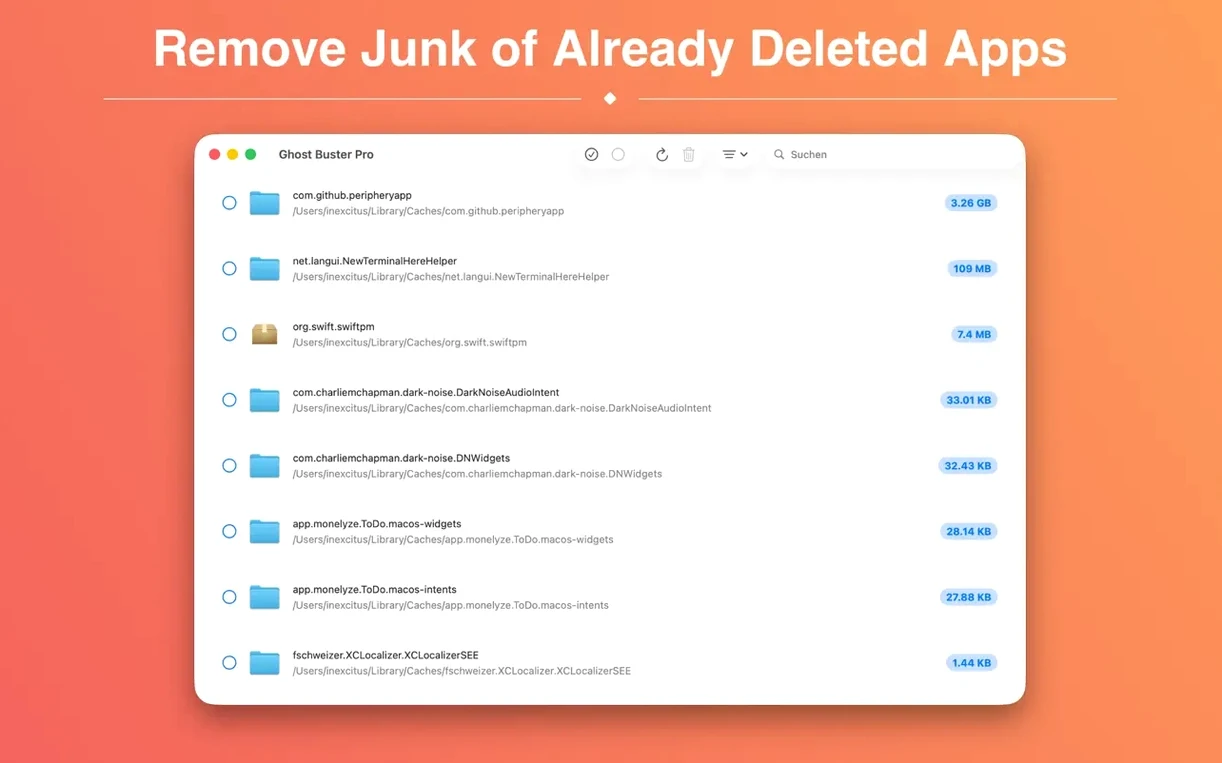
Smart Detection skips the obvious Library folders and digs into caches, containers, and group containers you'd otherwise check by hand. It builds a list of ghosts tied to apps you no longer have installed.
Hit scan and let it piece together file clusters from past app installs. You see the path and size of every orphaned plist, log, and support folder before you act.
Untick anything you want to keep. The app never deletes without your say-so, so a misidentified file stays put until you confirm it.
Once you've marked what to remove, a single click sends the lot to the trash. No digging, no Terminal commands, just a clean sweep of the scraps you chose.
Open it straight after you drag a dozen apps to the trash. The scan sees what your Launchpad forgot. You'll notice cached image filters, old audio-unit configs, and preference panes from apps you deleted months ago — files you'd never spot manually.
Run it weekly for a fortnight, then settle into a monthly rhythm. The first pass often grabs 300–500 MB of forgotten cruft. Later scans find less, and that's the point: you're staying ahead of the clutter.
Keep an eye on ~/Library/Group Containers entries. Many sync utilities and clipboard managers stash shared data there. Ghost Buster Pro surfaces them clearly, so you can decide if the leftover folder still serves another app on your Mac.
The most common slip is treating every listed item as junk. A preference file from an old Markdown editor might look orphaned, but your current writing app could still read it. Glance at the path before you tick the checkbox.
Another trap: scanning while an installer is running. Ghost Buster Pro lists files by what's present on disk, so a half-finished install looks like a deletable ghost. Wait until you've rebooted after a big app clear-out, then scan.
Some people chase zero results. A clean machine still logs diagnostic reports and sandbox caches that aren't tied to removed apps. If the list shows only small, system-like crumbs, you can leave them alone. The tool isn't a disk eraser — it hunts app leftovers specifically.
Dragging the app from the disk image to the wrong folder causes a silent fail on Monterey-style Gatekeeper setups. Use the Applications folder, then right-click and choose Open the first time. The install steps cover this, but skipping them leaves Ghost Buster Pro quarantined and the scan button greyed out.
The new icon for macOS 27 is a visual nudge, but the real shift is under the hood. Detection now reaches deeper into sandboxed containers that earlier builds missed — think Electron apps that scatter cache folders six levels deep. Scans on Apple Silicon finish a few seconds faster because the arm64 slice matches the hardware without Rosetta translation.
Family Sharing support means one download covers the household Macs. If someone else in your group uninstalls a bulky design suite, you can run Ghost Buster Pro on their machine under the same Apple ID umbrella and mop up the leftovers.
The French and Korean localisations now cover every button label and tooltip. If you switch your system language, the interface follows without a restart. Earlier versions had partial translations that left the deletion confirmation dialog in English; that gap is closed in 6.2.0.
Scan logic also handles apps that were moved between volumes. Previously, a ghost buster mac scan might skip an external drive's /Volumes traces. Now it picks up preference files left when you shuffled an app from an external SSD back to the internal drive and then uninstalled it.
Good to know: if you ever need a useful ghost torrent for large test batches of abandoned app data, a quick search surfaces community-curated zip bundles. But Ghost Buster Pro works best on your own real leftovers — the files it finds are already sitting on your Mac, waiting to be noticed.
No. It only removes files after you review the scan results and give explicit consent.
Yes, it supports Family Sharing, so up to six family members can use it with a single purchase.














Chat 0
Hop in or make an account to join the chat.
Quiet in here so far. If you have used this build, tell me what the install actually did.