
 MacBooster
 MacDroid Pro
 Lunar Pro
 MacFamilyTree
 Luminar Neo
 MacGPT
 Luminar AI
 Loopback


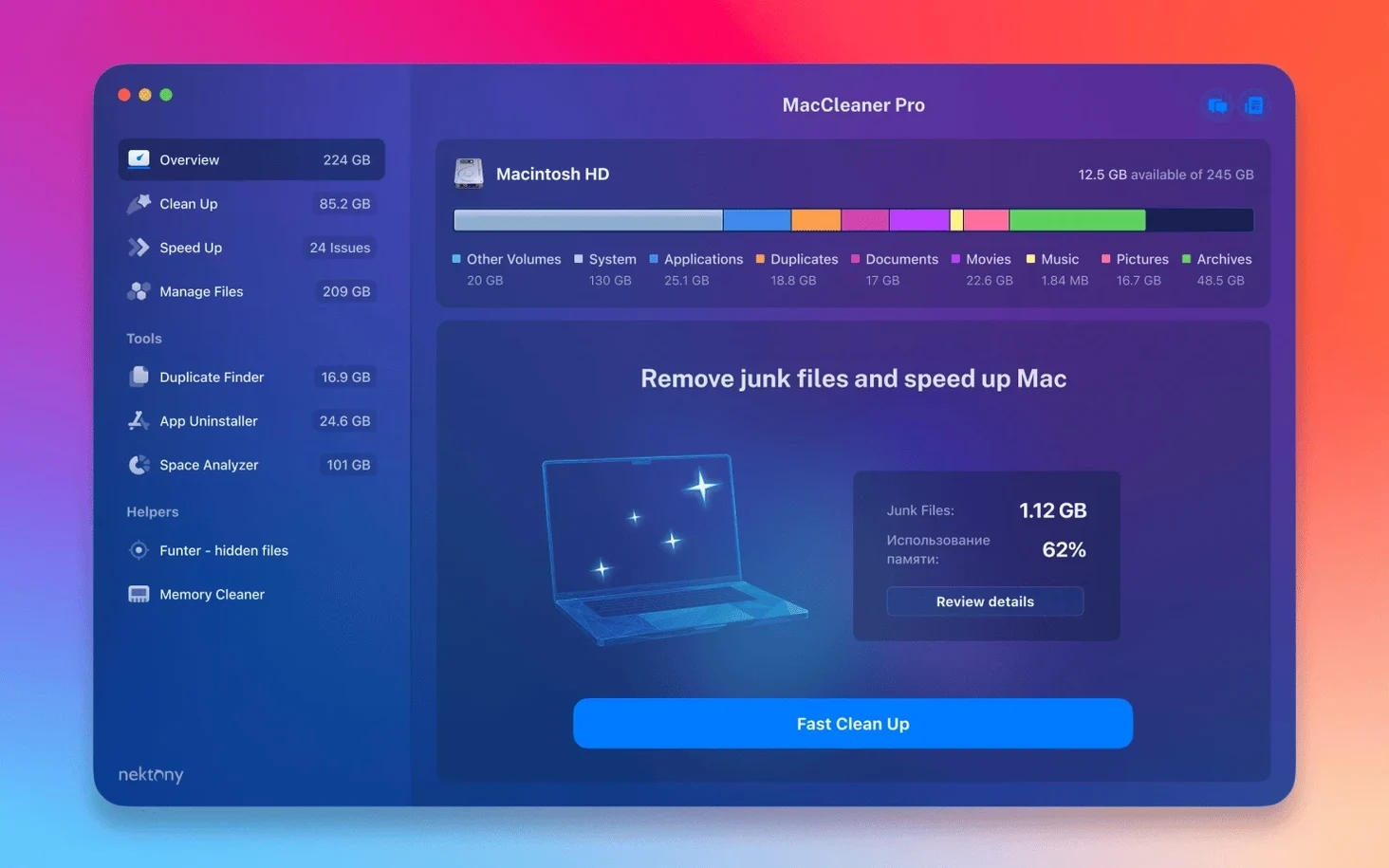
Disk Space Analyzer PRO is the part I reach for first. It maps your drive so you can spot where the big, forgotten folders are hiding, then decide what stays and what goes.
You get five tools that work together: App Cleaner & Uninstaller PRO, Disk Space Analyzer, Duplicate File Finder, Memory Cleaner and Funter. Think of it as a cleanup crew — one handles app removal and extension management, another tackles disk analysis, and the rest deal with duplicates, RAM pressure and hidden files.
App Cleaner & Uninstaller PRO removes applications and their leftover service files in one go. It also lists login items, launch agents and system extensions, which is handy when you want to trim what loads at startup.
It monitors memory usage and lets you purge inactive RAM when the system feels heavy. Not a speed hack — more like a quick way to reclaim working space after closing a large project.
Funter surfaces files the Finder normally hides, and Duplicate File Finder scans for copies you forgot you made. Between them and the disk analyser, it is easier to clear out clutter you did not realise was sitting there.
Most hiccups come down to scanning too broadly or expecting one tool to do another's job.
The individual tools launch quickly, and the whole bundle sits quietly until you open something. Memory Cleaner is the only component that runs in the background, and its footprint is small — a menu bar icon and a lightweight monitor. On an older Intel Mac, a full Disk Space Analyzer scan takes a while, but it does not lock the interface; you can keep working while the map builds.
Stability has been solid across the tools I use most. Duplicate File Finder handles large result sets without freezing, and App Cleaner & Uninstaller recalculates storage savings as you tick items. The bundle feels like five focused utilities rather than one heavy app, which keeps things responsive when you switch between jobs.
Battery impact is minimal outside active scans. If you are on a MacBook, run the big disk sweeps while plugged in and leave Memory Cleaner to its quiet monitoring.
Say the Startup Disk Full warning appears on a Friday afternoon. Here is how a cleanup usually goes.
Old Project Renders from two jobs ago. Right — those were meant to be archived and deleted..DS_Store files and temp files before emptying the trash.About twenty minutes later, the drive has room again and the Mac is tidier than it was at lunch.
MacCleaner Pro works alongside the tools macOS already gives you. Storage Management in System Settings shows the same broad picture, but Disk Space Analyzer gets more granular — folder by folder, with a visual map you can click through. Use both: the macOS view for a quick summary, the analyser when you need to hunt down specific space hogs.
The bundle also plays well with third-party workflows. If you use a cloud sync app or an external drive manager, Duplicate File Finder can scan those locations directly. App Cleaner & Uninstaller's extension list covers Safari and other browsers, so you can tidy add-ons without digging through each app's settings. Memory Cleaner complements Activity Monitor's memory tab — Activity Monitor shows what is using RAM, while Memory Cleaner gives you a one-click way to release inactive memory without quitting apps.
For anyone searching terms like maccleaner pro or maccleaner 4 pro, the appeal is the bundle approach: one installer, several focused tools. It does not replace macOS utilities so much as give you a faster route to the same results. And if you spot a mac cleaner torrent or maccleaner pro crack floating around, just make sure your security preferences allow the installation and you're good to go — the build itself is ready to run.
Yes, it supports both Apple Silicon and Intel 64-bit Macs running macOS 10.13 or later.














Chat 0
Hop in or make an account to join the chat.
Quiet in here so far. If you have used this build, tell me what the install actually did.