
 iZotope Neutron
Download iZotope Insight for macOS
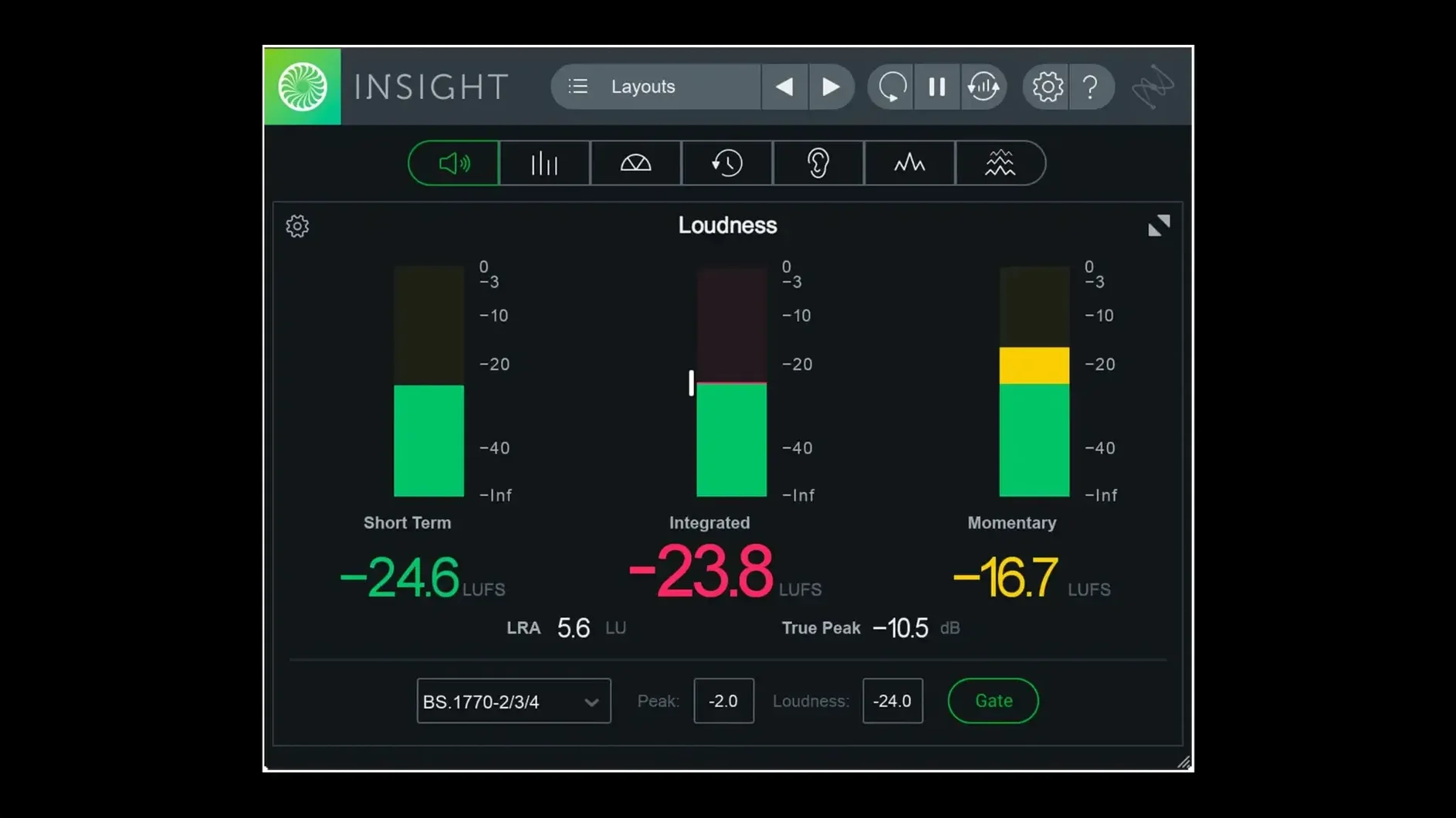
iZotope Insight 2 is a deep analysis and metering plug-in that turns sound into a detailed visual readout for mixing and mastering.
It gives you a row of resizable, configurable tools. You get True Peak Meters, a Loudness History Graph, a Stereo Vectorscope, and a 2D or 3D Spectrogram. The Surround Scope handles layouts up to Dolby Atmos 7.1.2. Each meter can be scaled to fit the corner of a session or expanded across a whole screen.
Troubleshooting a mix is straightforward. You route audio from any track or bus, and Insight 2 flags potential problems in real time with colour signals. The spectrum analyser shows exactly where low-end mud builds up, while the loudness meters track against updated broadcast standards.
On Apple silicon Macs, the latest version runs native arm64 AAX for Pro Tools 2023.3+. The preset manager now splits factory and custom tabs, keeping your go-to layouts easy to find.
Relying on just one meter
Relying on a single meter is the most common trap. A loudness reading alone won’t tell you why the stereo image feels lopsided, and a vectorscope won’t flag a frequency spike at 3 kHz. Keep at least three panels open early on — say, the Spectrum Analyzer, a Stereo Vectorscope, and the Loudness Meter — until you learn which pair answers each mix question.
Another slip: ignoring the colour signals. Insight 2 doesn’t just display numbers; it lights up when something crosses a threshold. If the True Peak meter flashes red, don’t shrug it off as a visual quirk. That’s the plug-in pointing at a spot that will clip on playback. Dig into the history graph, find the timestamp, and fix it at the source track rather than slapping a limiter across the master bus.
Beginners also tend to resize meters without checking what gets hidden. The Spectrogram in its smallest frame trims the low-end detail first. If you’re chasing a sub-bass rumble, pull the panel larger before assuming the mix is clean.
Drag back to check loudness history
The Loudness History Graph stores a long rolling buffer. Click and drag backwards over the timeline and Insight 2 shows the exact loudness value at any point — handy when a client asks “what happened around the two-minute mark?” You don’t have to replay the whole track.
Preset tabs added in version 2.4.0 separate factory layouts from your own. Once you’ve arranged a meter set for dialogue editing and another for music mastering, switch between them with one click. No more dragging panels around every session.
Routing from any bus, not just the master, is a quiet powerhouse. Send a drum subgroup into Insight 2 and watch the Stereo Vectorscope for phase cancellation before it hits the full mix. That saves hunting through sixteen individual tracks later.
Right-clicking any meter reveals a short options menu — scale, hold, ballistics, colour scheme. Most users miss it because the interface looks tidy. A two-second right-click often replaces a trip through the preset manager.
Meters freeze after plugin changes
Meters freeze or lag after a plug-in chain change. This usually means the audio driver’s buffer size is too low for the analysis load. Insight 2 processes real-time metering alongside your DAW, and a tight buffer starves it. Push the buffer to 512 or 1024 samples, let the meters catch up, then drop it back if tracking latency matters. On Apple silicon Macs the native arm64 build reduces this strain, but heavy sessions still benefit from the extra headroom.
Loudness readings don’t match what the broadcaster expects. Check the loudness standard selected in the preset. Insight 2 ships with updated broadcast profiles, but it won’t guess which one you need. If the spec says EBU R128, pick that explicitly. The plug-in defaults to the last-used standard, not the one you assume.
The Surround Scope shows an empty grid despite a multichannel track playing. Verify the track’s output routing matches the meter’s channel configuration. Insight 2 can display up to Dolby Atmos 7.1.2, but it won’t remap a stereo source into the surround channels automatically. Set the meter’s input to the correct bus width — usually found in the plug-in’s routing drop-down, not the DAW’s track settings.
Preset tabs won’t save a new layout. The preset manager splits factory and custom tabs, but it requires a manual save action. Arrange your meters, click the custom tab, and choose “Save preset as” rather than expecting the layout to stick across sessions. Once saved, it loads with all panel sizes and threshold colours intact.
- Native arm64 AAX support for Pro Tools 2023.3+ on Apple silicon Macs
- Native arm64 install support for Apple silicon Macs
- Factory and custom preset tabs added to the preset manager
- macOS Big Sur or later
- Apple silicon or Intel Mac







Chat 0
Hop in or make an account to join the chat.
Quiet in here so far. If you have used this build, tell me what the install actually did.