

Download LFOTool for macOS
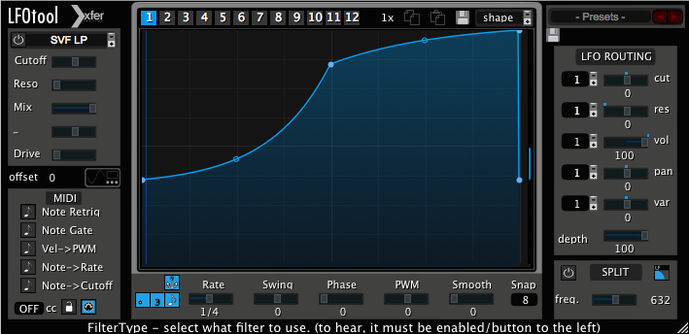
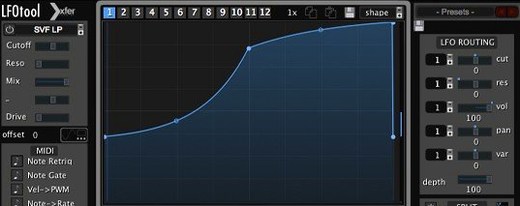
You drop LFOTool onto a synth pad, open the editor, and draw a custom curve. The sound starts to pulse with a timing that's locked to your track's BPM, adding a rhythmic volume dip that feels tight and musical.
Simulate a sidechain pump
Dial in a sharp downward slope on the graph to duck the volume on every beat. It gives you that classic compressor-breathing effect without routing a kick drum.
Build an auto-pan
Assign one of the four available graphs to Pan. A smooth, rising curve sweeps the sound across the stereo field, cleanly and in perfect sync.
Animate a filter cutoff
Route a graph to Cutoff and draw a stepped pattern. The tone opens and closes in precise jumps, turning a static pad into a textured sequence.
How LFOTool stacks up against similar Mac tools
There are a handful of modulation plug-ins on macOS that producers reach for, and they each have a personality. LFOTool sits in a sweet spot between deep editing and straightforward results.
LFOTool vs Cableguys ShaperBox
ShaperBox bundles multiple effects — volume, pan, filter, time, and more — into one window, each with its own editable LFO. It's fantastic for quick multi-effect chains. LFOTool takes a narrower lane: its four simultaneous graphs all live inside one preset, which keeps the CPU hit lower and the interface less crowded. Where ShaperBox gives you breadth, LFOTool gives you depth on a single curve editor. The tension handles on each point feel closer to vector-drawing tools, which can lead to smoother, more natural modulation shapes.
LFOTool vs Nicky Romero Kickstart 2
Kickstart 2 is purpose-built for sidechain-style ducking, with a clean waveform display and a handful of editable curves. It loads fast and does one job well. LFOTool covers that ground and then leaps past it. You get MIDI CC output, filter cutoff modulation, and up to 12 switchable graphs per preset. If all you need is a quick volume dip on every downbeat, Kickstart is lean and immediate. If you plan to sculpt custom LFOs for multiple targets and send MIDI to external gear, LFOTool pulls ahead.
LFOTool vs MeldaProduction MTremolo
MTremolo is free, hosts a capable LFO editor, and does tremolo and auto-pan without fuss. LFOTool is a paid plug-in with a sharper focus on the curve-editing experience — the point-and-tension system is more precise, and the graph library grows fast once you start saving your own shapes. The MIDI CC stream is absent in MTremolo, which makes LFOTool the pick if you want to modulate third-party synths or hardware from a single graph preset.
First-day tips for new LFOTool users
Start with a single graph, not four. Pick a preset from the factory library and tweak one parameter at a time. A good first experiment is the AutoPan preset folder — load one, switch the target to Volume, and watch how the curve shape changes the feel. Then swap the target back to Pan and nudge the tension handles to see how the stereo movement softens or sharpens.
Set the rate to BPM sync early on. Free-running hertz rates can be useful for sound design, but most musical results lock in better when the LFO follows your DAW's tempo. If your host supports sample-accurate sync, enable it in the plug-in — the timing will feel tighter, especially on fast, percussive material.
Try the MIDI output on day one, even if you have never used MIDI CC routing before. Drop LFOTool before a software synth, open the synth's modulation matrix, and pick a CC number that LFOTool is sending. Draw a simple rising curve and assign it to the synth's filter cutoff. The synth will respond as if you were turning a knob live.
Set default graph count to two for less visual clutter
Open the settings panel and set the default graph count to match your typical project. If you rarely use more than two graphs, starting with a cleaner two-graph layout reduces visual clutter. The global smoothing control is another dial worth nudging early. A small amount of smoothing rounds off sharp corners in your curves, which can prevent clicks on volume and pan targets without softening the modulation too much.
Switch on MIDI note graph switching if you plan to build a preset with multiple graph pages. This lets you change between the 12 available graphs by sending a MIDI note from a keyboard or a clip, which is far quicker than opening the plug-in window mid-session.
Fitting LFOTool into a bigger setup
LFOTool works best as part of a chain, not in isolation. Insert it after a reverb or delay to modulate the wet signal without touching the dry source. On a send track, it becomes a rhythm gate for a whole group of instruments — drop it on a drum bus, load a choppy gate curve, and the entire kit breathes with one shared pulse.
The MIDI CC stream opens up connections to hardware. Route a MIDI track from LFOTool to an external synth over a USB or DIN cable, and you have a dedicated LFO engine for any knob on your desktop synthesizer. Many producers run two instances — one for audio ducking on the bass group, another as a MIDI source for a soft synth's wavetable position — and the two stay locked because both read the same BPM from the DAW.
macOS features like Audio Units and the IAC Driver can route LFOTool's MIDI output between different applications. If you are running a standalone synthesizer app alongside your DAW, LFOTool can send CC messages across the IAC bus, turning the plug-in into a modulation bridge. Keep the buffer size modest and the sync sample-accurate, and the timing stays reliable across multiple programs.
For producers searching for an lfo tool mac solution that goes beyond volume ducking, the plug-in earns its place on insert slots, send channels, and MIDI tracks alike. A single instance on a pad or pluck can replace a compressor sidechain, a filter sequencer, and a pan modulator — three tasks that would otherwise need separate plug-ins and more screen space.
- macOS 10.11 or later
- Intel or Apple Silicon Mac
- A host that supports VST or AudioUnit plug-ins
Questions I get
Yes, it can output MIDI CC data from its LFO shapes, letting you control other instruments or effects with the same curves.
Up to four graphs can run simultaneously, each targeting parameters like Cutoff, Reso, or Pan.
It comes in VST, AudioUnit, and AAX formats, all written in C++ to keep CPU load low.







Chat 0
Hop in or make an account to join the chat.
Quiet in here so far. If you have used this build, tell me what the install actually did.