
 Amadeus Pro
 Alcove
 Airfoil
 Airflow
 AirBuddy
 Antivirus Zap - Virus Scanner
 AIMP
AIMP Aiarty Video Enhancer


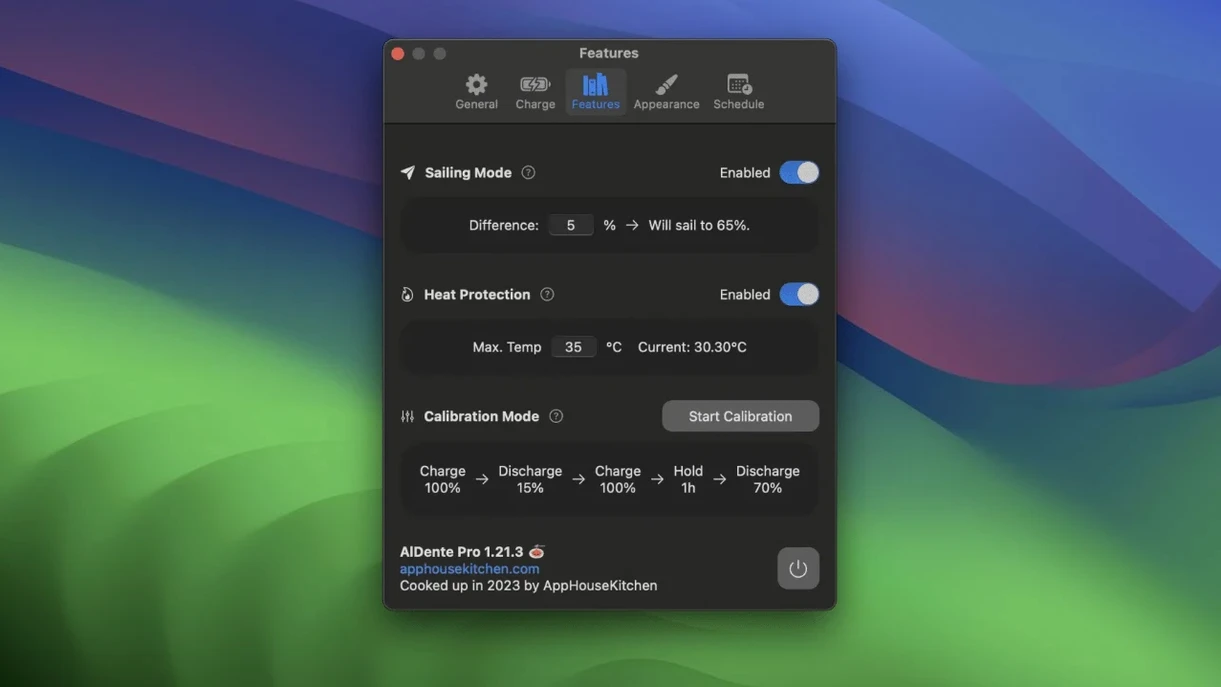
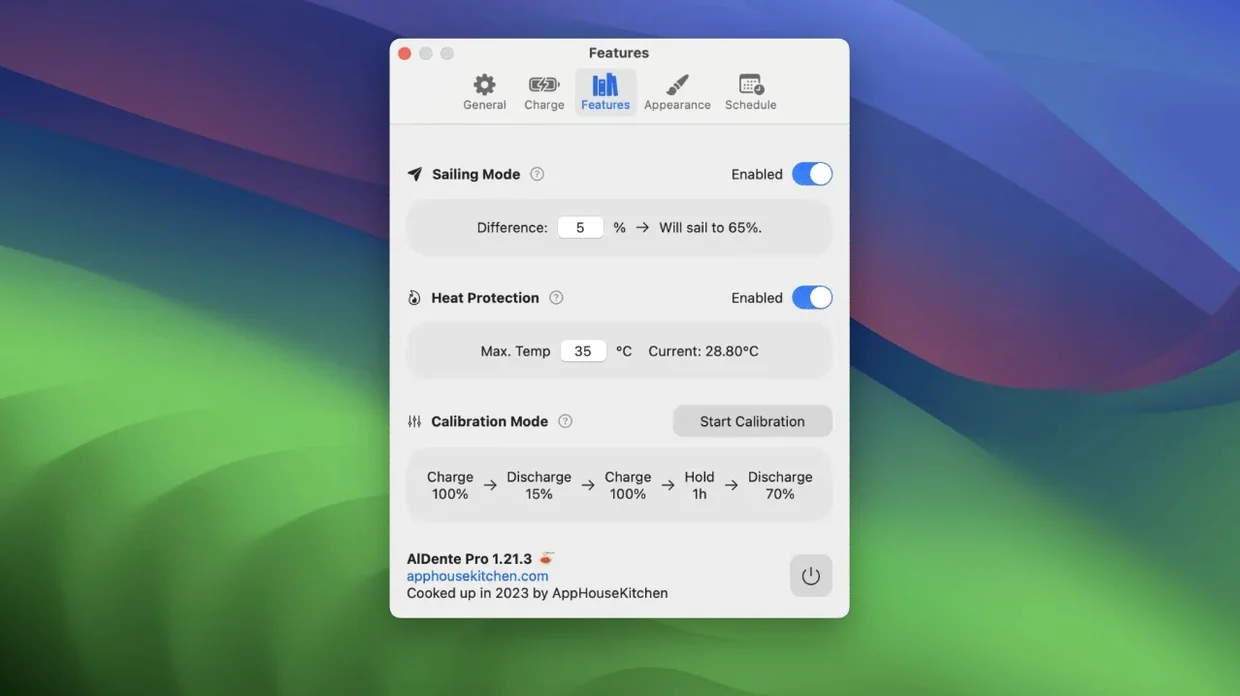
AlDente is a charge limiter and battery monitoring tool built specifically for MacBooks. It lets you cap the charging percentage to reduce wear on the battery, then tracks temperature and capacity in a clean popover panel.
Version 1.39.4 tidies up visual glitches in the popover that appeared in early macOS 27.2 builds. The rest of the feature set remains unchanged: you still get the same charge limit slider, heat protection toggle, and real-time power metrics that have been the core of the app for a while. English, German, Japanese, Simplified Chinese and several other interface languages are included, and it runs natively on both Apple silicon and 64‑bit Intel MacBooks running Monterey or newer.
Heat protection kicks in when the battery temperature climbs past a threshold you define. Calibration mode is still there too, letting the battery drain and recharge fully to keep percentage readings accurate. Live stats — current charge, capacity, temperature, and whether the MacBook is drawing power from the adapter or the battery — sit in the menu bar popover unchanged. The app continues to support a long list of interface languages: Russian, English, German, Arabic, Greek, Spanish, Italian, Traditional and Simplified Chinese, Korean, Dutch, Polish, Portuguese, Turkish, French, and Japanese.
You plug in at the desk around 9 a.m. The MagSafe light glows amber, then green sooner than you’d expect. AlDente has already stopped the charge at 80%, so the adapter runs the laptop directly. The menu bar icon shows a tiny green plug and the percentage sitting steady.
Mid-morning, you unplug for a meeting. The popover slides open with a click — temperature reading 31°C, capacity at 98% of design, discharge rate ticking at 6 watts. Nothing to worry about. You close the lid and move.
After lunch, the room warms up. The battery sensor nudges past 35°C. Heat protection blinks a warning in the menu bar and briefly pauses charging. A few minutes later the temperature drops, charging resumes, and you never touched a setting.
Late afternoon, you decide to calibrate. You click Calibration Mode before heading to a coffee run. AlDente lets the battery drain right down to 5%, then charges it uninterrupted to 100%, then holds it there for an extra hour to let the controller chip relearn the capacity curve. You return to a fully topped-up reading and a percentage that feels honest again.
The whole session runs on autopilot. You set the limit once, tweak the heat threshold if you use the MacBook outdoors, and otherwise just glance at the popover now and then to confirm everything is humming along.
The app lands quietly. Drag it into Applications, open from Launchpad, and a small battery icon appears in the menu bar. No setup wizard, no permissions chain longer than the screen. Two things worth doing straight away:
In the first couple of days, just watch. Open the popover when you plug and unplug. Notice when the adapter bypasses the battery entirely — the power flow indicator shows it as “adapter only.” That’s the core behaviour you want. Later, if the percentage reading starts to drift, schedule a calibration run overnight. The mode takes a few hours and the MacBook can stay asleep through most of it.
A small tip: if you use a Thunderbolt dock, the charge limit works exactly the same as with the MagSafe cable. No extra config needed. The app reads the power source, not the port.
Version 1.39.4 is a small housekeeping update. The popover — the compact panel you click open from the menu bar — had a couple of drawing quirks on macOS 27.2 betas. Labels overlapping, a flicker when switching between tabs. This release smooths those out. The fix is cosmetic, but it matters on a screen you check multiple times a day.
Earlier updates in the 1.39.x line sharpened the sailing mode behaviour. Instead of rigidly sticking to one percentage, the charge level can drift a little within a narrow band — similar to what Apple’s own optimised charging does, but with a range you control. In practice, this means the battery spends less time micro-cycling at the limit, which is gentler on the cells over months of desk use. The feature runs silently; you might never notice it except the menu bar occasionally shows 79% instead of 80%.
Calibration mode also grew a bit more patient in recent builds. It now waits for the battery to cool before starting the full charge leg, avoiding a calibration run that races through a heat spike. That change makes the percentage reading more trustworthy when you check it later in the week.
AlDente sits alongside macOS Battery Health Management rather than fighting it. Apple’s built‑in feature learns a routine and adjusts charging over weeks. AlDente gives you a hard limit from day one. Both can run at the same time, though many users switch off the system setting and keep manual control. If you prefer a hybrid, leave both on and set AlDente’s limit a few percent below the macOS optimised level — the stricter of the two wins.
With menu bar real estate at a premium, the app keeps its footprint small. It plays nicely with Bartender and Hidden Bar; just drag the icon into the hidden section if you want a cleaner bar. The popover still opens with a click or a keyboard shortcut you set in System Settings.
Power users often pair AlDente with a system monitor like Stats or iStat Menus. One handles battery policy, the other graphs battery drain over time. Together they give you a full picture — AlDente saying “charge held at 80%,” the monitor showing a flat discharge curve when the adapter is connected.
Shortcut support is another quiet connector. You can toggle the charge limit or heat protection from a Shortcut, which means a single menu bar click or a focus mode change can switch profiles. Useful if you have a “desk mode” that caps at 75% and a “travel mode” that lets it fill to 90% an hour before you leave.
If you’ve searched for an AlDente Pro Mac torrent that matches your routine, the free version already covers the big three — limit, heat, calibration. The pro tier adds sailing mode fine‑tuning and live power flow details, but the core loop works without it. People poking around for an AlDente Pro crack or AlDente cracked download often just want the pro features; the free app already does more than macOS offers out of the box. An AlDente Pro cracked version can unlock those extras right away, and an AlDente crack gives you a chance to explore the update path that keeps the popover clean on new macOS builds.
Finally, the app speaks the same language as your system. If your MacBook runs macOS in French, Japanese, or Polish, the interface follows — no extra language pack to hunt down. That localisation extends to the popover tooltips and the calibration instructions, which helps when you’re tweaking settings for the first time.
Yes, it supports both Apple silicon and 64‑bit Intel MacBooks running macOS 12 Monterey or later.
It pauses charging automatically when the battery temperature exceeds a limit you set, helping avoid heat-related wear.
Yes, the app includes Russian, English, German, Arabic, Greek, Spanish, Italian, Chinese (Traditional and Simplified), Korean, Dutch, Polish, Portuguese, Turkish, French, and Japanese.














Chat 0
Hop in or make an account to join the chat.
Quiet in here so far. If you have used this build, tell me what the install actually did.