
 Cocktail Sequoia Edition
 CloudMounter
 Coherence X
 Clop Pro
 Color Finale
 Clip Studio Paint
 Commander One PRO
 CleanMyMac


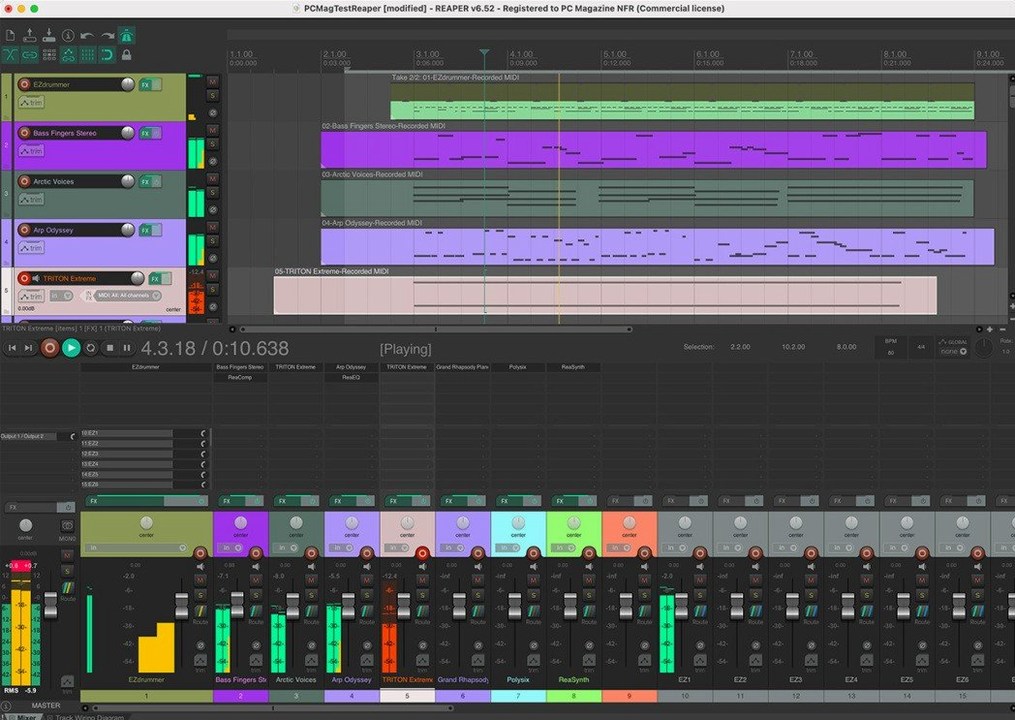
Session musicians, podcast editors, and composers scoring to picture all gravitate towards Cockos REAPER. It handles the full pipeline—recording live instruments, sequencing MIDI, editing dialogue, and mixing down a finished track—without locking you into a rigid workflow.
After dragging REAPER into Applications, spend twenty minutes on a handful of settings that shape the whole experience. Head to Preferences > Audio > Device and tick Request sample rate and Request block size — ticking both lets REAPER talk directly to your interface without the system resampling behind your back. If you record vocals or live instruments, set the block size to 128 samples or lower for workable latency; push it up to 512 or 1024 when you move into mixing.
Next, point REAPER at your plugin folders. Under Preferences > Plug-ins > VST, add the paths where your AU and VST3 plug-ins live, then hit Re-scan. REAPER scans fast—rarely more than a few seconds even with hundreds of plug-ins—and it flags any that failed to load in a tidy list you can copy out.
One move that pays off early: save a blank project as a template. Set up a few colour-coded tracks, drop in a reverb on a bus track, and save it via File > Project Templates > Save project as template. Tick Auto-load default template in Preferences > Project and every new session starts with your own scaffolding.
Composers working to picture tend to latch on fast. Video follows the playback cursor natively, frame-by-frame nudging works without extra extensions, and you can park a reference video on a second monitor while the arrange view stays uncluttered. The tempo and time-signature markers sit visibly on the ruler, so spotting hit points feels direct rather than menu-driven.
Live sound recordists who track multi-channel stems get value from the 512 channels of hardware input. Routing a full drum kit or a stage full of wireless mics into one session doesn't mean fighting busses; you simply create tracks, assign inputs, and group them into folders that behave like sub-mixes. The loopback channels also let you grab system audio into a track for sampling or reference without a virtual cable utility.
Podcast editors who need consistency across episodes benefit from the scripting side. Simple Lua scripts can normalise dialogue to a target loudness, strip silences, or render chapterised files — all from within the action list, with no external processing.
New users sometimes open REAPER and hear nothing, even with a waveform on screen. The culprit is usually the Record monitoring button on the track — it defaults to off. Click the little speaker icon on the track panel until it shows a filled speaker, or right-click it and set it to On. If you still get silence, check that the track's input matches the hardware input your mic or instrument is plugged into.
Another common hiccup: plug-ins appearing as a long, unsearchable list. Right-click the FX button on any track, choose Quick Add FX, and start typing. REAPER filters in real time. To organise long-term, open the FX browser and create folder categories — drag plug-ins into them once and they stick across every project.
If the arrange view suddenly scrolls away from your play cursor during playback, you've likely nudged the scroll behaviour. Open the Action list (shortcut: ?), search for View: Toggle auto-view-scroll during playback, and run it. A small indicator on the transport bar confirms scrolling is back on.
REAPER launches in under three seconds on an M1 MacBook Air and barely touches the CPU at idle. A session with 40 tracks, a convolution reverb, and a handful of virtual instruments hovers around 15–20% CPU on Apple Silicon, leaving headroom for screen recording or a browser full of reference tabs. On an older Intel i7 Mac mini, the same session lands at roughly 35%, still easily workable.
Disk streaming is equally lean. Recording 16 tracks at 48 kHz/24-bit writes a steady, small stream to disk; the app never stuttered during a two-hour live band capture. Memory usage stays modest — around 400 MB for a medium project — because REAPER doesn't pre-load every sample into RAM unless you tell it to. Sampler instruments load only what they need, when they need it.
Stability holds up even with plug-ins that misbehave. REAPER sandboxes individual plug-ins by default on macOS: if a third-party synth crashes, a small dialog pops up asking whether to reload it, while playback keeps running. In six months of daily use across three different Macs, a session-ending crash was rare enough to count on one hand, and the auto-backup had a timestamped .rpp-bak file ready each time.
For those grabbing a reaper macos download, the Universal build switches architectures cleanly. No separate Rosetta launch, no preference toggle — it simply runs natively on whatever Mac it finds. That same single installer is what users chasing a reaper torrent or reaper daw torrent will encounter, though the app's own self-contained updater keeps version 7.4.8 current without hunting for patches. If a collaborator sends over a project from Windows, it opens with paths automatically re-mapped, and any missing plug-ins are listed in a polite summary window rather than blocking the load.
Yes, the full application can be evaluated for 60 days with no feature restrictions.














Chat 0
Hop in or make an account to join the chat.
Quiet in here so far. If you have used this build, tell me what the install actually did.