
 QSpace Pro
 ProPresenter
 QuarkXPress
 Prizmo Pro
 Principle
 Radio Silence
 RAR Extractor - unzip
 PowerPhotos


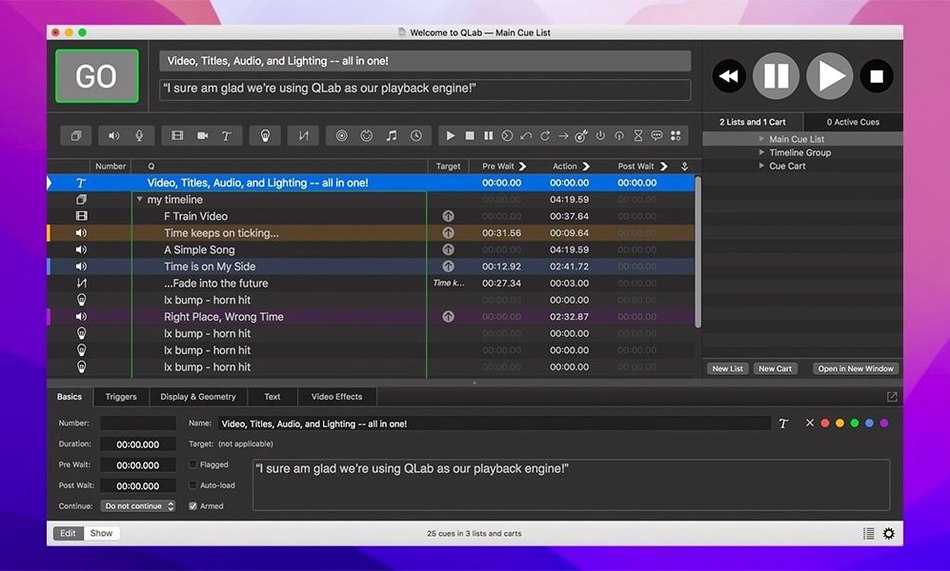
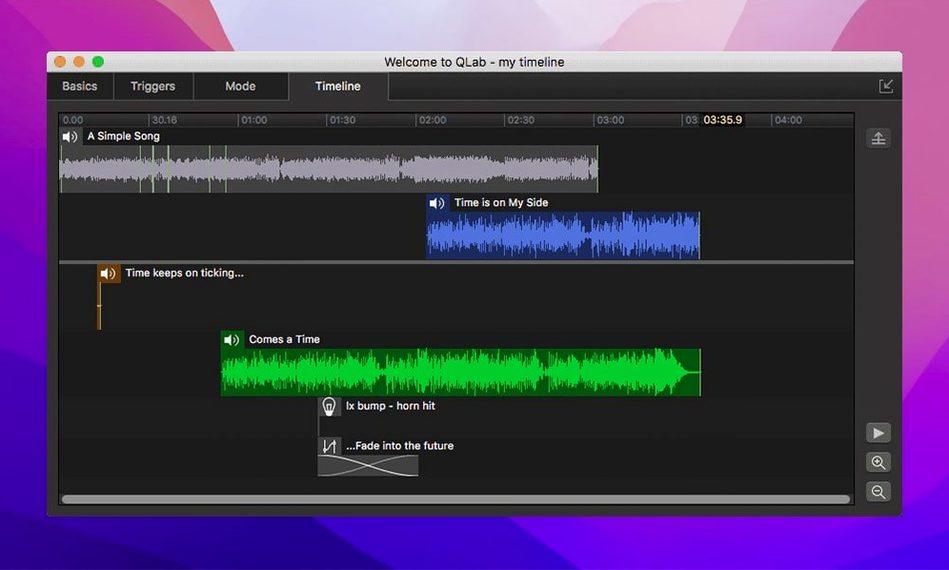
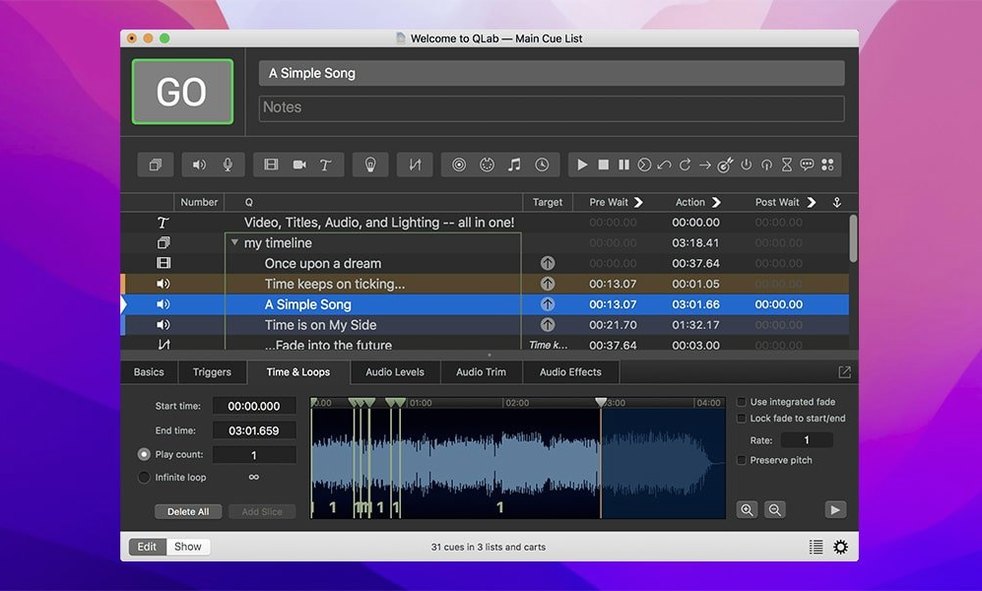
48 audio outputs and 24 audio inputs sit inside a single workspace. That scale gives you room to route a full orchestra pit, stage monitors, and lobby speakers from one Mac, but the real draw is how the pieces lock together. Sound, video, and lighting cues fire in sequence or overlap, and you can tweak a fade or trim an audio clip without leaving the timeline.
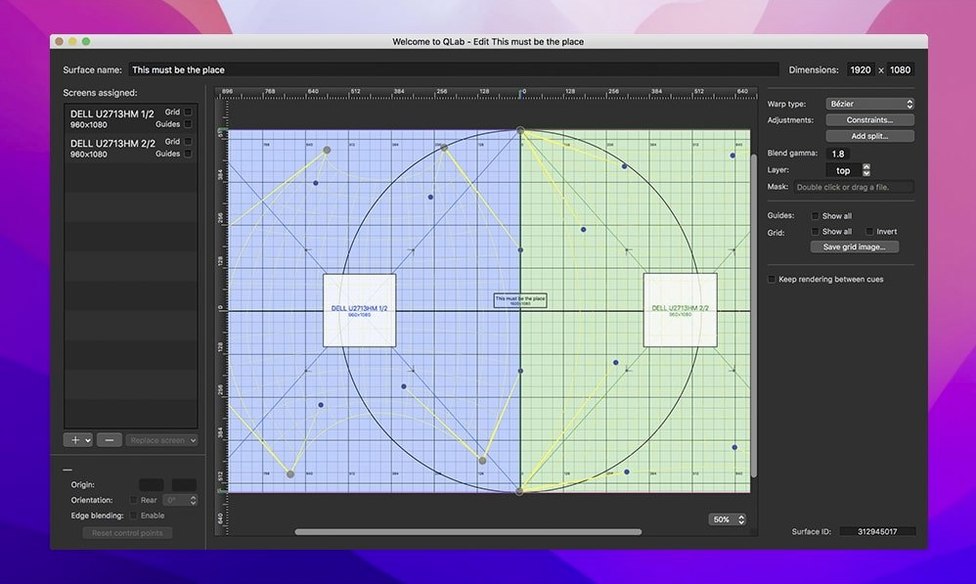
Keystone correction and corner pinning let you square the image back up. You can also reverse or centre the picture if the projector sits behind the screen or off-axis. Live video inputs from Blackmagic devices feed straight into a cue, so a camera pointed at the stage becomes just another source you can scale and mask.
Every change inside the app is undoable. That covers trimming in the integrated audio editor, reordering cues, and adjusting animation paths. It also covers the Light Library, where misconfigured rows now change colour to flag a problem before you hit “go.”
Version 5.6.3 tightened a few things that matter in a dark booth. The Light Patch editor now shows a Broken status when an instrument definition is misconfigured, and related rows in the Light Library or Light Definition editor shift colour. It’s a small visual nudge, but when you’re patching dozens of fixtures ten minutes before doors, a red-tinted row saves a phone call to the lighting designer. The update also migrates older workspaces to the built-in network device definition for Right On Cue Services Stage|Tracks, so a show file from last season loads without a manual re-patch.
It depends on the cue count and the video resolution, but QLab stays leaner than its feature list suggests. A cue list with hundreds of audio slices and a few 1080p video layers barely nudges an M1 Mac mini. Video effects and Syphon feeds push the GPU harder, and you’ll hear the fans on an Intel machine once you stack three 4K surfaces with corner pinning. Audio routing across 48 outputs doesn’t add measurable CPU load because the mixer engine was built for that scale from the start. The bigger drag is disk speed: a long multi-track session benefits from an NVMe drive over a spinning external.
Three snags come up often enough to mention. The first is audio levels jumping after an edit. The integrated audio editor trims non-destructively, but if you adjust a fade and then re-trim the start point, the fade envelope can shift with the region. The fix is to set your trims first, then draw fades. Another pain point is Syphon input disappearing after a sleep cycle. A quick workaround is to disable automatic graphics switching and keep the Mac awake during long tech sessions. The third is MIDI triggers going dead when a workspace moves between machines. The cue numbering stays identical, but MIDI device IDs can change. Open Workspace Settings and re-scan the MIDI setup to rebuild the mapping.
If you’re hunting for a qlab crack or a qlab 5 crack, you’ll find versions floating around. Some work, some don’t. The TNT release behaves like the real thing for local playback and editing. Cue-labelling, group loops, timecode triggers and the audio editor all work as expected. Network cues and multi-machine sync can be dialled in on qlab cracked builds — just match the build number across all Macs and confirm the Bonjour names resolve. A qlab torrent might also bundle an older build that won’t open a workspace saved in 5.6.3, so check the version before you overwrite a working install.
The obvious crowd is theatre technicians who already think in cues and fades. They open the workspace and see a timeline that matches their prompt book. Less obvious: sound designers who mix podcasts or live radio. The audio editor isn’t a full DAW, but the ability to trim, set level envelopes, and fire clips with a spacebar tap makes it a quick assembly tool for a live-to-air segment. Video install artists get a lot from Syphon and the projection mapping tools, especially if they’re driving multiple projectors from a single machine. Musicians who run backing tracks and click tracks lean hard on the adjustable playback speed with pitch control; slowing a rehearsal track by 15% without the chipmunk effect keeps a session moving while someone works out a part.
If you’re a solo operator who runs sound, lights, and projections from one laptop, the value is in the single workspace. You’re not switching between a lighting desk, a video switcher, and a DAW. You’re building a show in one file and hitting one button to fire everything. That’s the quiet power of it.
Rows in the Light Library or Light Definition editor now change colour when an instrument definition is misconfigured, so you catch errors before show time.
Workspaces from 5.6.2 and earlier migrate to the built-in network device definition for Right On Cue Services Stage|Tracks automatically.














Chat 0
Hop in or make an account to join the chat.
Quiet in here so far. If you have used this build, tell me what the install actually did.