


Download Cableguys Snapback for macOS
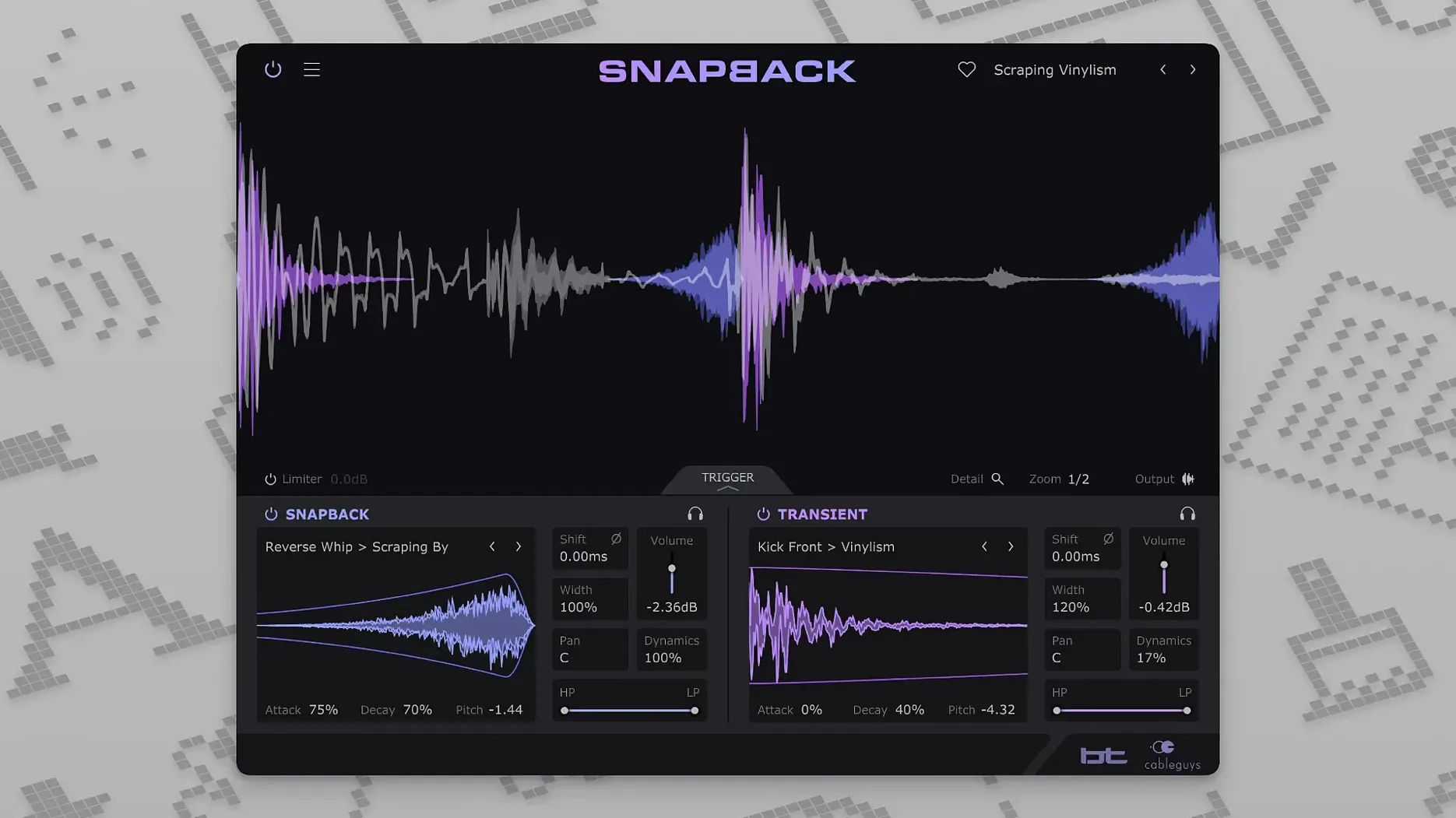
Cableguys Snapback is a drum-layering plugin that snaps any sample into perfect time with your original hit.
- Load it on a drum track. Snapback watches the incoming audio and detects every transient.
- Drag in your own sample or pick from the 200+ built-in. You can layer a snare with a clap, a kick with a sub thump, or place a reverse swell just before the transient.
- Adjust the timing. The offset control lets you shift the sample earlier or later — including pre-transient positions for reverse buildups and room sounds.
- Check phase. A dedicated phase control keeps low-end layers tight instead of cancelling each other out.
Version 1.1 keeps the core workflow unchanged but adds a dedicated Reverse button, so flipping a sample is instant rather than a manual workaround. MIDI port support also jumps from 16 to 256, which matters in larger setups with lots of controllers feeding trigger signals. The plugin still runs on Intel and Apple Silicon Macs, in VST 2, VST 3, AU, and AAX hosts.
Transient markers light up on every kick
You’ve got a kick drum that punches but feels a little hollow. Load Snapback onto the channel in Logic Pro. The waveform lights up straight away — every kick transient gets a small marker overlay, even on a busy loop with hats bleeding through. No threshold tweaking needed.
Open the browser and flick through the built-in kicks. Audition a low 808-style thump with the solo button. It lands perfectly on each hit, no dragging or nudging. Dial the offset back a few milliseconds so the sub sits just under the attack of your original kick. Instant weight.
Now pull the pitch down a semitone. The layer thickens without clashing. Flip the phase with one click and listen to the low end lock in. Add a gentle low-pass filter to keep the sub in the 60–80Hz zone. Three minutes in, and the kick sounds like it was tracked that way.
Drop a second layer — a short reversed click from the factory library, placed before the transient. The Reverse button added in version 1.1 makes this dead simple: select the sample, hit Reverse, set a negative offset. The click sweeps up into the kick, adding a snatched, electronic edge. Resize the waveform view to zoom in on the transient zone and fine-tune the placement sample-accurately.
High-pass filter stops double-triggering on hi-hats
Nothing is perfect, but most bumps are quick to flatten.
- Double-triggering on busy loops. If Snapback fires on hi-hats you meant to ignore, don’t reach for the manual. Drop a high-pass filter before the plugin in your DAW — this strips out low-level chatter and leaves only the snare or kick transients. Snapback’s detection works best on short, defined peaks.
- Phase weirdness at the transient. Layering two low-end sounds can hollow out the attack if their waveforms oppose each other at the very front. Use the sample’s start-point trim (drag the waveform edge inside the display) alongside the phase flip. A couple of samples’ shift often fixes what the phase button alone can’t.
- Samples landing late after a bounce. Some hosts report latency differently with PDC-heavy chains. If you notice consistent offset after bouncing, print the layered track in real time with the host’s delay compensation turned off for the bounce pass. Snapback itself adds negligible latency.
- Imported samples missing. Snapback references user samples from their original location. If you moved a folder after importing, the plugin shows a red filename. Just drag the same sample in again from its new spot.
One-shot samples turn into stacked custom hits
Producers working on tight, electronic drum programming tend to bond with it fastest. If your kicks and snares come from one-shot libraries, Snapback turns a flat sample into a stacked, custom hit in seconds. The pre-transient placement is especially useful for drum and bass, techno, and pop production where reverse swells and ghost notes are part of the groove vocabulary.
Mix engineers handling live drum recordings also get a lot of mileage. Layering a clean sample under a poorly recorded kick or snare is a bread-and-butter move. Snapback’s transient detection means you are not manually placing samples on a grid — the plugin follows the drummer’s push and pull. The waveform visualizer makes it easy to confirm alignment at a glance, which matters on a tight mix deadline.
Sound designers who build custom percussive textures benefit from the pitch and envelope controls. Dropping a field-recording snippet onto a snare hit, pitching it down an octave, and shaping it with the amplitude envelope creates hybrid hits that would take far longer to align by hand. The filter section pulls out mud or adds air without leaving the plugin.
If you are someone who has searched for a Cableguys Snapback crack or a Snapback VST torrent just to test whether the workflow clicks, the plugin’s immediate feedback loop is the real draw. It rewards experimentation, and the built-in library is strong enough to use without ever dragging in your own samples — though you probably will.
- Reverse button added for one-click sample flipping.
- Addressable MIDI ports increased from 16 to 256.
- macOS 10.13 or later
- Intel or Apple Silicon processor
- VST 2, VST 3, AU, or AAX host







Chat 0
Hop in or make an account to join the chat.
Quiet in here so far. If you have used this build, tell me what the install actually did.