

Download Cymatics VOXITY for macOS
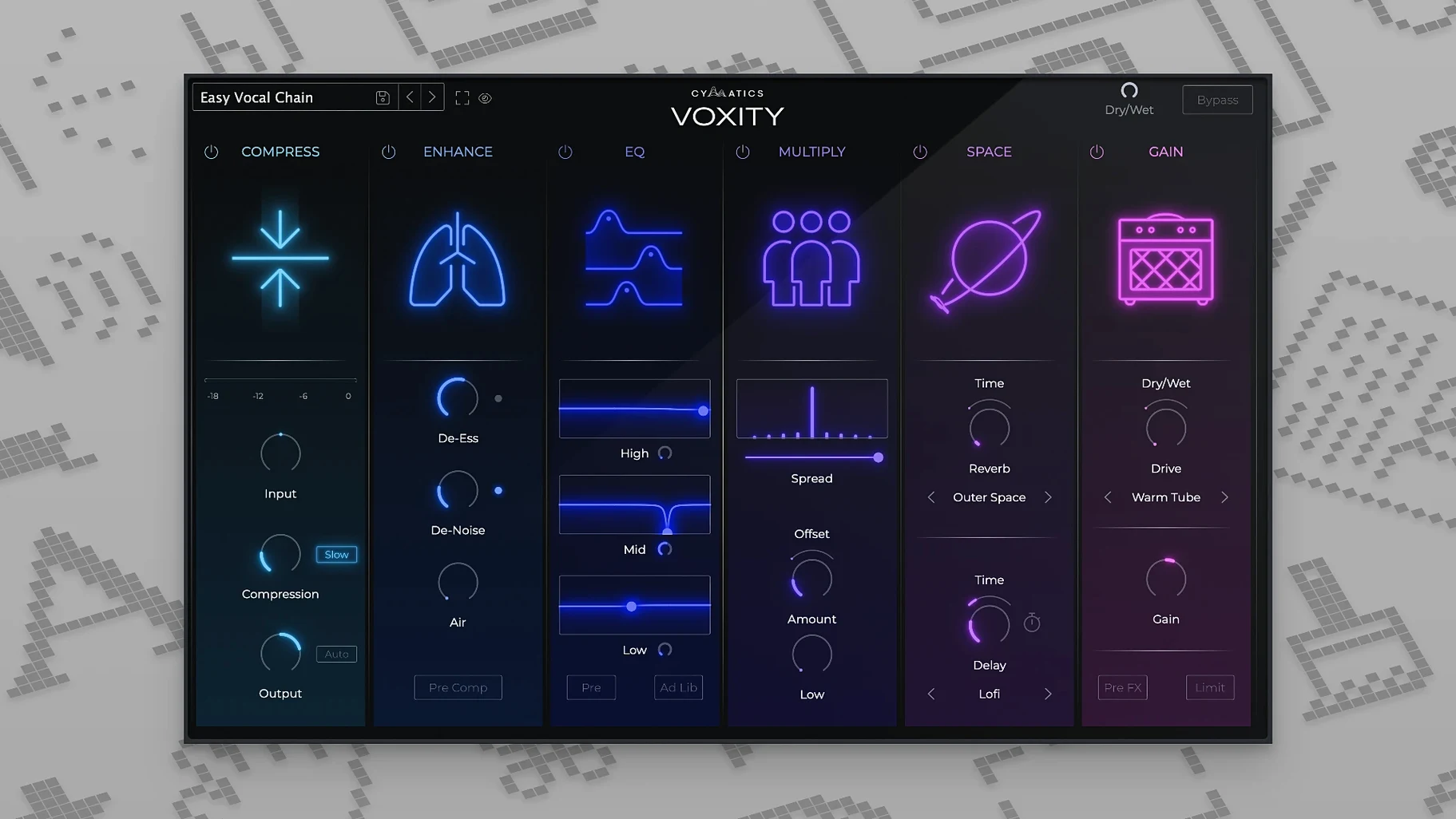
If you’re used to cleaning up vocals with a channel strip, think of VOXITY as the finishing stage that sits right after it. Where your go-to EQ and compressor handle tone and dynamics, this plugin steps in to shape the space around the voice — widening the stereo field, evening out the level, and pulling back intrusive breaths and sibilance. It’s a focused set of shaping tools, not a full channel strip replacement, and its job is to get a dry vocal sitting confidently in a mix without endless tweaking.
| Detail | Info |
|---|---|
| Type | Vocal mixing plugin |
| Developer | Cymatics |
| Current version | 1.0.0 |
On a vocal bus, the stereo widening can push backing harmonies out toward the edges without making the lead feel disconnected. The built-in volume levelling irons out performance bumps so you’re not riding faders through every phrase, and the de-harsh module quietly dials back the frequencies that fatigue an ear over a long listen. Throw in the echo and reverb section and you’ve got a pocket-friendly way to add tail and depth. The preset bank covers a spread of styles — tight pop, airy R&B, lo-fi rap — so you can audition a sound and then tweak it to suit the singer rather than building from silence each time.
Barely 3% CPU on an M1 Air
On an M1 MacBook Air, VOXITY sits lightly. A single instance barely nudges the CPU meter — Logic’s performance monitor shows it hovering around 2–3% during playback of a 24-track session. Stacking it across five vocal busses pushes that closer to 8%, which still leaves plenty of headroom for other processing. No audio dropouts, no GUI lag when dragging the stereo width slider mid-playback.
The plugin doesn’t report any noticeable latency. I’ve tracked through it a few times when a singer wanted a rough sense of space in the headphones, and the monitoring felt immediate — no comb-filtering or delayed slapback that sometimes creeps in with heavier lookahead processors. Memory use stays modest too. After an hour-long session with four instances running, Logic’s RAM usage had barely shifted from its baseline.
Stability-wise, version 1.0.0 hasn’t thrown a single crash across AU and VST3 formats in Logic Pro, Ableton Live, and Studio One. Bypassing and re-engaging during playback is clean — no clicks, no momentary silence. That’s the kind of quiet reliability you want from a plugin you’ll probably insert on every vocal track in a project.
Pull the De-Harsh knob back to 20%
Out of the box, a few defaults are worth nudging before you do anything else.
- De-Harsh amount. The knob defaults to 50%, which can dull a naturally bright vocal. Start at 20–30% and dial up only if you hear actual fatigue in the 3–6 kHz range. On a well-recorded condenser mic, you might leave it under 15%.
- Breath control threshold. The factory setting catches most inhales, but quiet passages sometimes trigger it late. Lower the threshold by 5–10 dB for softer singers — you’ll hear the difference immediately on a headphone check.
- Stereo width on the master bus. If you’re inserting VOXITY on a summed vocal aux, pull width back to around 30%. Anything wider and ad-libs start floating too far from the centre image, especially on smaller speakers.
- Reverb mix lock. The echo and reverb share a send-style routing internally. To keep the tail consistent while you audition presets, set the reverb mix first, then lock it mentally — the preset switcher sometimes resets it to a splashy 40% wet.
Double-click any knob to snap to default
A few things in the interface don’t announce themselves but save real time once you spot them.
Double-click resets any knob to its default. Useful when you’ve pushed the brightness control too far and want a quick reference point. The de-harsh and breath modules both respond to the same gesture.
Presets save the width setting independently. You can lock a stereo spread you like and still flip through vocal styles without it changing — the width knob sits outside the preset recall path. That’s not documented, but it’s consistent across the 1.0.0 build.
The level meter doubles as a gain-reduction indicator. When the volume levelling is active, the meter shows how much it’s pulling back peaks. Glance at it during a loud chorus and you’ll see the exact dB of attenuation, which makes gain-staging into the next plugin easier to judge.
Shift-drag on the echo time syncs it to tempo divisions. No menu, no dropdown — just hold Shift and the time knob snaps to 1/4, 1/8, 1/16 and dotted values. Quick way to match a slap delay to your project BPM without counting milliseconds.
Taming a raw pop vocal in one insert
Monday evening. A raw lead vocal from a pop session lands on the timeline — uneven in level, a few sharp sibilants poking through, and the singer’s breaths are crowding the quieter lines. First move: insert VOXITY on the vocal track, right after the channel strip EQ.
Open the preset browser and flick through to “Pop Lead – Forward.” It loads a mid-width stereo spread, moderate de-harshing, and a short plate reverb. The vocal immediately sounds closer to finished — but the reverb tail is a touch long for the tempo. Shift-drag the echo time to 1/8 dotted, pull the reverb mix down to 22%, and the space tightens up.
The chorus still pushes too hard. Glance at the level meter — it’s grabbing 6 dB on the loudest syllables. That’s a bit much, so back the levelling intensity off to 40%. Now the quieter verse lines still come forward without the chorus feeling squashed. The breath control catches most inhales, but one sharp gasp before the bridge slips through. Lower the threshold another 4 dB and it disappears.
Duplicate the plugin onto the backing vocal bus. Switch the preset to “Wide Harmonies,” push the width to 60%, and kill the reverb entirely — the lead’s tail already glues the group. Three more tweaks to the de-harsh on the lead, and the whole vocal arrangement sits balanced, wide without feeling processed. Total time: under ten minutes.
That’s the rhythm of working with VOXITY. It doesn’t ask you to build a vocal sound from scratch. It gives you a shaped starting point and a handful of controls that respond exactly the way you’d expect. For producers who’ve hunted down a cymatics voxity mac build that runs cleanly on Apple Silicon, the plugin slots into a session without friction and stays out of the way while you work.
- macOS 10.14 or newer
- Intel or Apple Silicon Mac
- 64-bit host application
Questions I get
It combines stereo widening, volume levelling, de-harshing, and time-based effects like echo and reverb to polish and place a vocal in a mix quickly.
Yes, VOXITY supports macOS 10.14 and later and runs as a 64-bit plugin on both Intel and Apple Silicon Macs.







Chat 0
Hop in or make an account to join the chat.
Quiet in here so far. If you have used this build, tell me what the install actually did.