


Download elastiquePitch for macOS
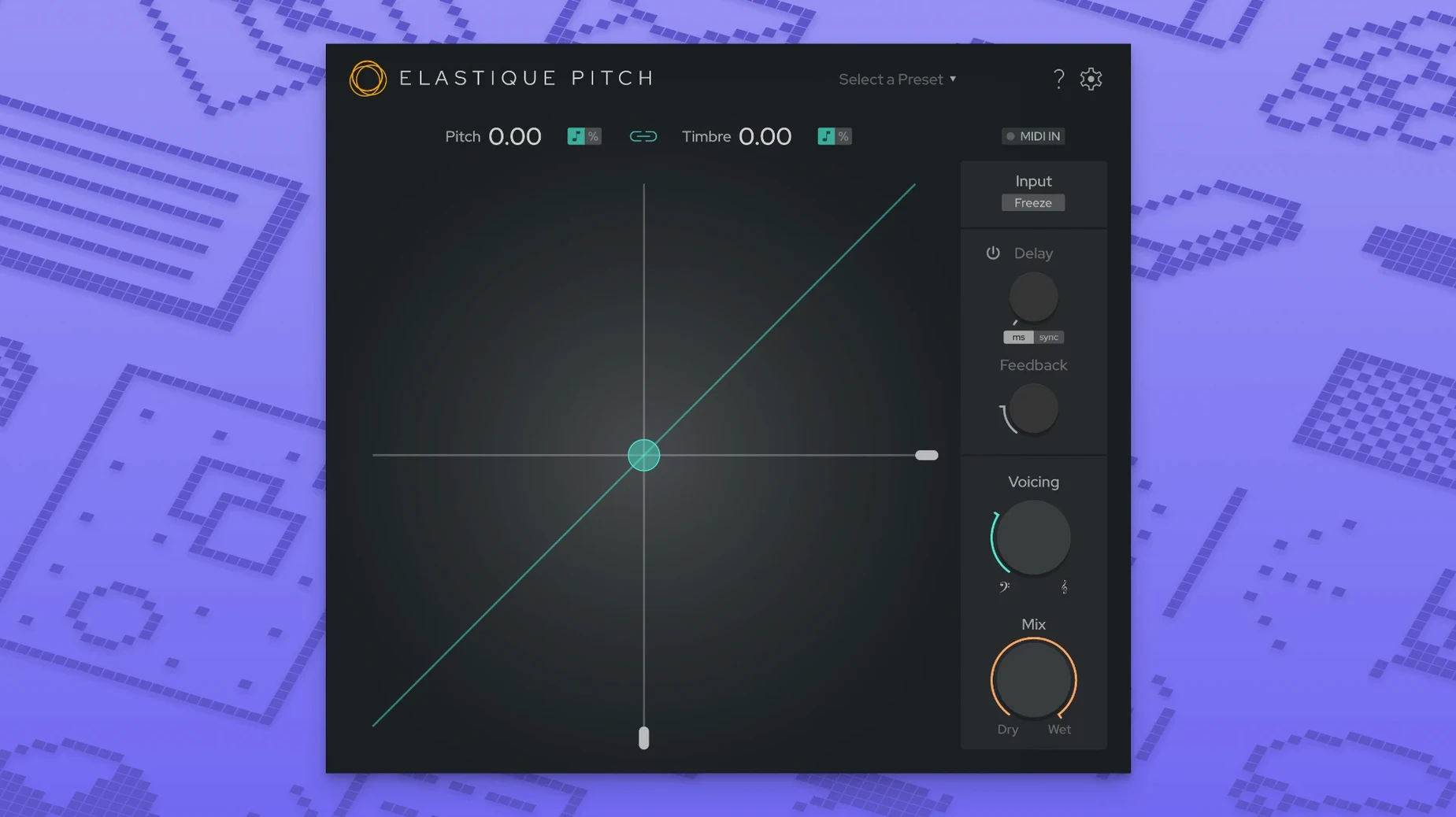
Pitch-shifting that drags a vocal out of tune the moment your buffer size creeps up is a momentum killer. elastiquePitch v2 keeps things tight, even in a busy session.
Real-time pitch shifting — handles transposition on the fly without pre-rendering, so you can tweak while the track plays.
Formant shifting — moves the character of a voice or instrument independently from pitch, handy for gender-bending a take or keeping body on a pitched-up snare.
Grain freeze — grabs a tiny slice of audio and holds it, turning a syllable or a guitar pluck into a pad or texture.
Multichannel — works across up to 16 channels, so surround and ambisonic projects are on the table.
Drop it on a vocal bus to nudge a chorus up a semitone without the chipmunk artefacts, or strap it across a dialogue track when frame-rate conversion shifts the timing. The redesigned interface in v2.5 keeps the controls close: big pitch dial, formant fader, and a grain freeze button that reacts like a momentary switch.
Fitting into your setup
elastiquePitch slides into a Mac DAW without fuss. It shows up as a standard AU, VST3 or AAX plug-in — whichever your host prefers — so Logic, Live, Reaper and Pro Tools all see it the same way. Because it runs native on Apple Silicon, the plug-in shares the same memory space as your other ARM-native instruments and effects, which keeps latency predictable when a project crosses 40 or 50 tracks.
On the macOS side, it respects Core Audio's multichannel routing straight out of the box. If your interface is sending a 7.1.4 bed, elastiquePitch maps across all 16 channels without extra wrappers. The plug-in also plays nicely with the system-wide microphone privacy indicator in recent macOS releases — no workarounds needed when you route live input through a DAW channel.
Pair it with a spectral editor for surgical cleanup beforehand, then use elastiquePitch for the broad, real-time moves. The grain freeze output records into any downstream processor, so a frozen syllable can feed a convolution reverb or a sidechain compressor.
Twelve minutes with a vocal take
Imagine a lead vocal that sits right emotionally but lands a fraction flat on two held notes. You drop elastiquePitch on the insert slot and loop the offending phrase.
First minute: the big pitch dial nudges up 35 cents — the tuning settles without the warble you get from a heavy-handed auto-corrector. The formant fader stays at zero, so the singer's timbre doesn't thin out.
Minute three: you duplicate the track for a parallel chain. The second instance shifts pitch up a full octave and pushes formants down by 15 percent, giving a husky, breathy double that sits behind the lead. Blend it low on a fader.
Minute six: the bridge needs texture. You automate the grain freeze button for two syllables, record the output to a new audio track, then stretch the frozen grains into a three-second pad with option-drag in your DAW. Reverse the clip, add a long tail of reverb, and it becomes a transition sweep.
Minute twelve: you add a pitch-shifted slapback on a return track — 12 ms delay, pitch up 7 cents, formants down a touch. Just enough width to make the centre vocal feel anchored.
Transient snap preserved on wide pitch shifts
The jump to the ÉLASTIQUEPRO algorithm in v2.5 tightened up transient handling noticeably. Quick consonants — 't', 'k', 'p' — keep their snap when you shift a spoken line by more than a tone, where earlier builds could smear the attack.
The redesigned interface shrank the click distance between controls. Pitch and formant sit on the same visual plane, so adjusting one while watching the other in your peripheral vision is quicker. The grain freeze button now has a hold-to-freeze, release-to-dissolve behaviour that suits live automation passes and hardware MIDI mapping without latching issues.
Multichannel expansion to 16 channels made the plug-in practical for post-production rooms working in Dolby Atmos beds. Previously, you'd need multiple instances bussed across channel groups; now one instance covers the whole bed, keeping phase relationships intact when shifting ambient stems or full surround recordings.
- Redesigned interface with a cleaner, faster layout.
- Multichannel support expanded to 16 channels.
- Updated engine running the latest ÉLASTIQUEPRO algorithm.
- macOS 10.15 or later
- Intel or Apple Silicon Mac
- DAW that hosts AU or VST3 plug-ins
Questions I get
It requires macOS 10.15 or later and runs on both Intel and Apple Silicon Macs.







Chat 0
Hop in or make an account to join the chat.
Quiet in here so far. If you have used this build, tell me what the install actually did.